
Definition of Page Margin in Document
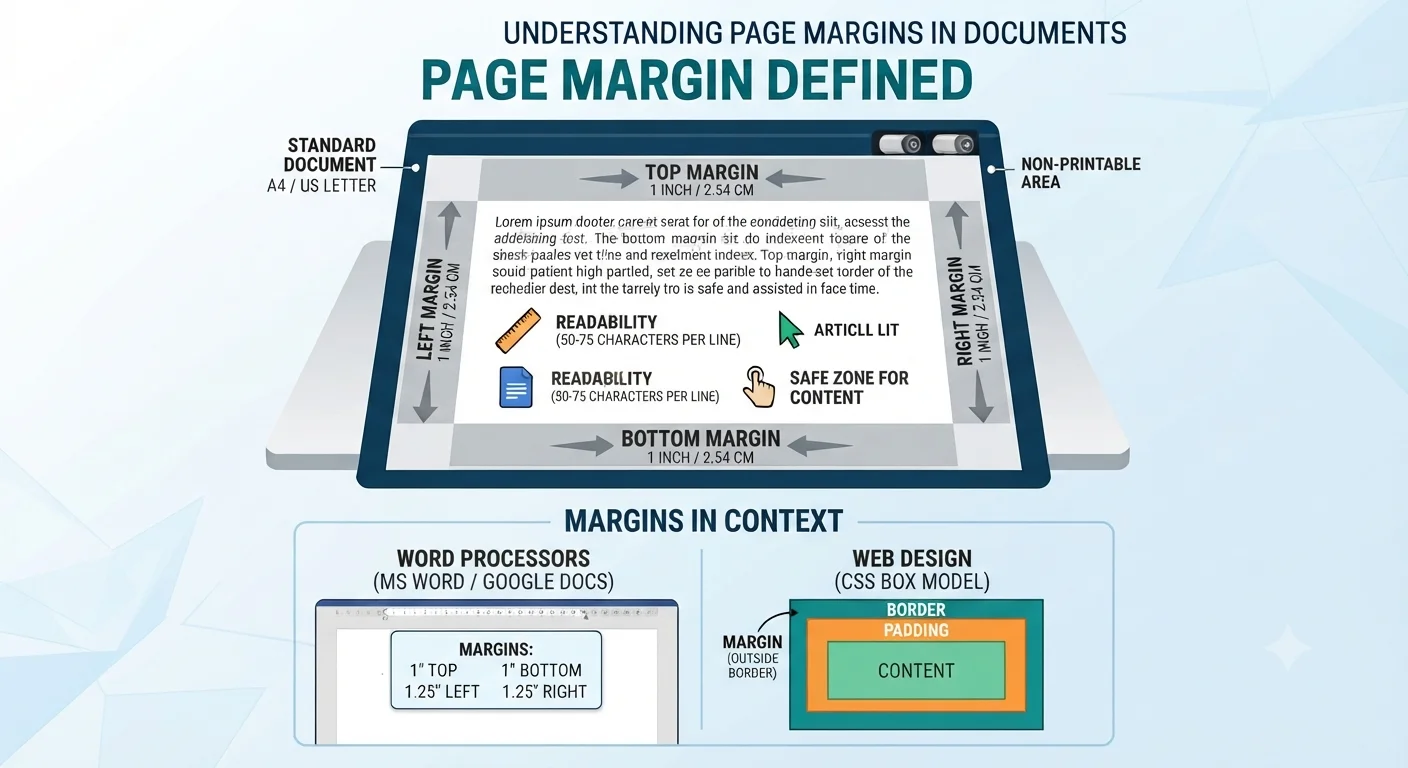
A page margin is the blank space between the edge of a page and the main body of text. Word processors and design software define this area to separate content from the paper’s physical boundaries. It acts as a container for your text, images, and data.
Analogy of Page Margin
Consider a printed photograph. The picture frame provides a rigid border that separates the image from the surrounding wall. A page margin functions in the same way for a document. The margin provides a visual boundary that separates your text from the edge of the paper. Without this frame, the text visually merges with the desk or table beneath it.
Anatomy of a Document Margin
A standard document contains four distinct margin areas. Software interfaces represent these areas as gray spaces on the ruler.
- Top margin: Controls the distance between the top edge of the paper and the first line of text.
- Bottom margin: Controls the distance between the last line of text and the bottom edge of the paper.
- Left margin: Sets the starting boundary for text on the left side of the page.
- Right margin: Sets the ending boundary for text on the right side of the page.
In my computer science classes, I instruct students to view margins as required personal space for their text. Without this space, the page layout appears unprofessional and overcrowded.
Why Do Documents Need Margins? (Page Layout Rules)
Margins serve specific mechanical and visual functions in document creation. They are not simply empty areas where you cannot type.
1. Readability and the “Line Length” Rule
A page without margins forces the human eye to travel too far from the left edge to the right edge. This excessive travel causes visual fatigue. Readers lose their place on the page easily. Good document design prevents this issue. Typography experts state that a line of text should contain an average of 50 to 75 characters.
- Narrow margins create long lines of text that tire the reader.
- Wide margins create short lines of text that break reading rhythm.
- Standard margins balance the text block for maximum reading speed.
2. Non-Printable Area and Print Bleed
Home and office printers cannot print ink all the way to the edge of a standard sheet of paper. The mechanical rollers grip the edges of the paper to pull it through the machine. Printers leave a small unprintable strip on all sides.
- Non-printable area: The physical zone where the printer rollers grip the paper.
- Safe zone: The area inside the margins where you place important text.
- Bleed: A specific printing term where ink extends past the margin line to ensure no white edges remain after cutting.
If you type text into the non-printable area, the printer simply cuts off the letters. Margins keep your content within the safe zone.
3. Gutter Margin for Binding and Annotations
Documents require extra space on the inside edge if you plan to bind them into a book or report. This specific margin area is the gutter margin. Standard left and right margins do not provide enough space for binding mechanisms. When a document uses spiral binding or stapling, the bound edge consumes a portion of the paper.
- The gutter margin adds extra blank space specifically to the left or inside edge.
- It prevents text from bending into the curved spine of a bound document.
- It allows the reader to read the text flat on a desk without forcing them to pry the book open.
Every academic year, students submit term papers with standard one-inch margins. I observe at least three students lose visible portions of their text into the spiral binding because they forget to add a gutter margin.
Word Processors vs Web Design: How Margins Change
The definition of a margin shifts depending on the software environment. Print design and web design handle blank space differently.
Margins in MS Word and Google Docs (Print-Centric)
Word processors like Microsoft Word and Google Docs treat margins as physical measurements tied to paper sizes. You measure these margins in inches or centimeters. The software bases the layout on standard paper dimensions like US Letter (8.5 x 11 inches) or A4. The margin settings directly dictate where the printer head applies ink.
Margins in Web Development: The CSS Box Model
Tech lovers and computer science students must understand how margins function in web design. Web pages do not have physical paper edges. Instead, web browsers use the CSS Box Model to create space around HTML elements. In web development, a margin creates space outside the border of an element. This concept confuses many beginner programmers.
- Margin: The transparent space outside the element’s border that pushes other elements away.
- Padding: The space inside the element’s border that pushes the content away from the edge.
- Border: The visible line between the padding and the margin.
If you set a CSS margin on a paragraph, it pushes the adjacent paragraph further down the screen. It does not change the background color of the paragraph itself.
Standard Margin Sizes and Custom Margins (MLA & APA Guidelines)
Academic institutions and publishers require specific margin sizes. You must apply these standards correctly to meet submission guidelines.
“1-Inch” Golden Rule (APA & MLA Formats)
The standard margin size for high school and college assignments is one inch on all sides. The Modern Language Association (MLA) and the American Psychological Association (APA) both mandate this format. This one-inch standard ensures uniformity across all student submissions. It provides enough space for teachers to write grading notes in the margins.
When to Use Narrow, Wide, or Mirror Margins
Different document types require you to set custom margins to serve specific functions.
- Narrow margins (0.5 inches): Resume builders use narrow margins to fit more text onto a single page.
- Wide margins (1.5 to 2 inches): Poetry books use wide margins to center short lines of text.
- Mirror margins: Book publishers use mirror margins for double-sided printing. The inside margins face the binding, and the outside margins face the edges of the book. You use section breaks in your word processor to activate mirror margins.
Real-World Scenario: What Happens When You Ignore Margins?
Students frequently attempt to manipulate margin settings to bypass page limits. I recently observed a 10th-grade student change all page margins to 0.25 inches to force a five-page essay onto three pages. The student sent the document to the school printer.
The printer cut off the first two letters of every line because it printed directly into the non-printable area. Furthermore, the line lengths became so long that reading the text caused immediate eye strain. The student received a failing grade for improper document formatting. Proper page layout protects the integrity of your content.
How to Adjust Margins and Change Page Setup (Quick Steps)
You can easily adjust margins and change your page setup in a few clicks within any standard word processor.
In Microsoft Word (Formatting Menu)
Microsoft Word provides preset margin options and custom margin settings in the main formatting menu.
- Click the “Layout” tab on the top ribbon.
- Select the “Margins” button to view default options.
- Choose a preset (Normal, Narrow, Wide) or click “Custom Margins” at the bottom.
- Enter your exact measurements for Top, Bottom, Left, Right, and Gutter in the page setup dialog box.
- Click “OK” to apply the changes to your document layout.
In Google Docs (Page Setup)
Google Docs stores margin settings directly inside the page setup menu.
- Click the “File” tab in the top left corner of the screen.
- Select “Page setup” from the dropdown menu.
- Type your required measurements into the Top, Bottom, Left, and Right boxes.
- Click the “Set as default” button if you want all new documents to use these specific margins.
- Click “OK” to apply the settings and update your white space.
Frequently Asked Questions (FAQs)
What is the difference between margin and padding in computers?
Margin creates space outside the border of an element, pushing other elements away. Padding creates space inside the border, pushing the element’s own content away from the edges. Word processors use margins for paper edges, while web design uses both margins and padding for screen layouts.
Can margins be different on the same page?
Yes. Word processors use a feature called “Section Breaks” to allow different margin sizes on the same page. You can set the top half of a page to have wide margins and the bottom half to have narrow margins by inserting a section break.
What is a mirror margin?
Mirror margins set opposing pages with inside and outside margins instead of standard left and right margins. Book publishers use mirror margins so the gutter margin always faces the binding of the book, ensuring the text stays centered on the page when the reader opens the book flat.