
Every time you read a news article, watch a YouTube video, or visit a school website, someone has published that content on the internet. That process is called web publishing.
I have been teaching computer science and digital literacy for over a decade. I have walked hundreds of students through their first published web page. I still remember the moment one of my Grade 10 students saw his name appear on a live URL for the first time. He said, “This means anyone in the world can see this right now?” — Yes. That is exactly what web publishing does.
Definition of Web Publishing
Web publishing is defined as the process of creating content and making it available on the internet through a website or web page.
In simple terms, web publishing means:
- You create content (text, images, videos, or a mix)
- You place that content on a web server
- Anyone with internet access can now view it through a web browser
Web publishing is also called online publishing or digital publishing. The content you publish can be text articles, photos, audio files, videos, infographics, animations, or interactive tools.
Types of Web Publishing
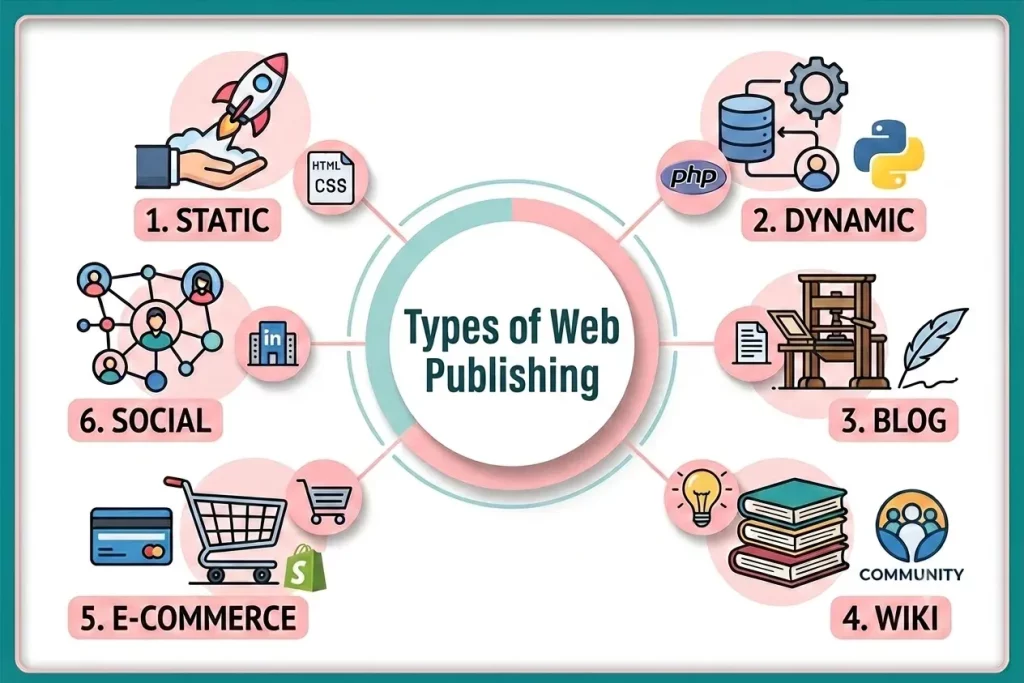
Web publishing takes many forms. Each type serves a different purpose and audience. Here are main types of web publishing:
1. Static Web Publishing
A static website displays the same content to every visitor. The content does not change unless the publisher manually edits the files.
- Best for: Personal portfolios, school project pages, small business landing pages
- Technology used: HTML, CSS files
- Advantage: Fast loading, simple, secure
- Disadvantage: Not flexible, hard to update frequently
- Example: A student’s online CV
2. Dynamic Web Publishing
A dynamic website generates content in real time based on user input or database information. Different users may see different content.
- Best for: News websites, social media platforms, e-commerce stores
- Technology used: PHP, Python, MySQL databases, server-side scripting
- Advantage: Highly flexible, personalized content
- Disadvantage: More complex to build and maintain
- Example: Amazon.com shows you personalized product recommendations
3. Blog Publishing
A blog is a type of website where content appears in reverse chronological order, newest posts first.
- Best for: Personal writing, educational content, opinion pieces
- Popular platforms: WordPress, Blogger, Medium
- Key feature: Regular updates, reader comments, RSS feeds
- Example: A science teacher who publishes weekly experiment guides
4. Wiki Publishing
A wiki is a collaboratively edited web publication. Multiple users can add, edit, and update content.
- Best for: Knowledge bases, encyclopedias, documentation
- Example: Wikipedia. The world’s largest wiki, with over 62 million articles
- Advantage: Community-driven accuracy and updates
- Disadvantage: Risk of vandalism or incorrect edits without proper moderation
5. E-commerce Web Publishing
An e-commerce website publishes product listings, prices, and handles online transactions.
- Best for: Businesses selling products or services online
- Platforms: Shopify, WooCommerce, Daraz (Pakistan’s leading e-commerce platform)
- Key elements: Product pages, shopping carts, payment gateways
6. Social Web Publishing
Platforms like Medium, Tumblr, and LinkedIn Articles allow users to publish content directly on existing platforms without building their own website.
- Best for: Writers, professionals, beginners
- Advantage: Built-in audience, no hosting needed
- Disadvantage: You do not own the platform — the company controls your content
How Does Web Publishing Work?
Web publishing follows a clear process. Every website on the internet goes through these core steps.
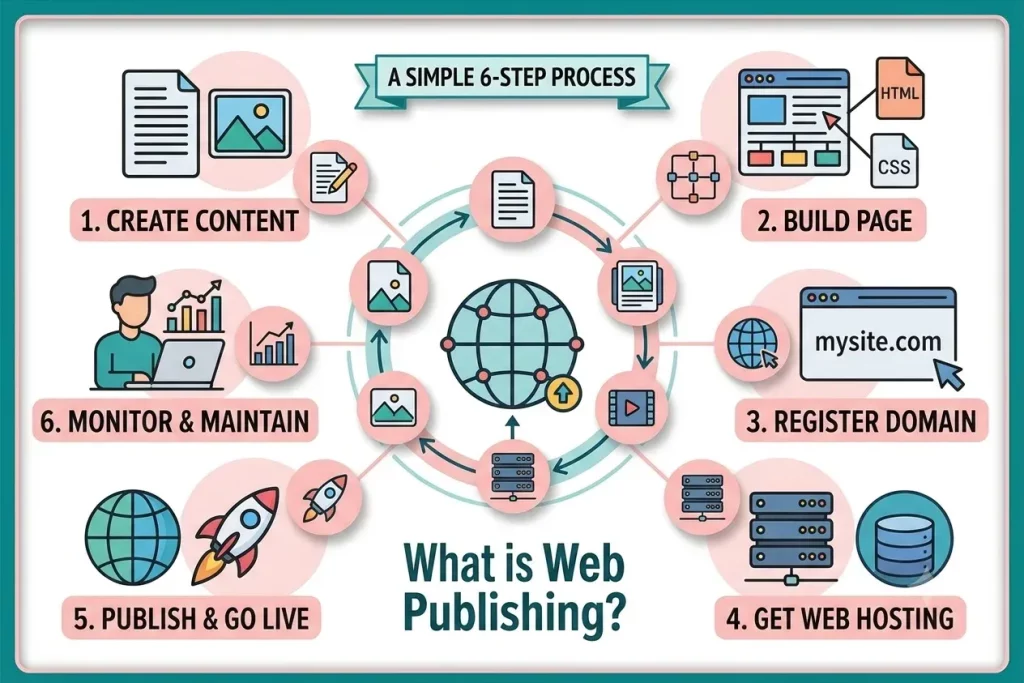
Step 1: Create Your Content
Content is the foundation of web publishing. Content can be:
- Text — articles, blog posts, product descriptions, tutorials
- Images — photos, diagrams, infographics, screenshots
- Video — tutorials, vlogs, product demos
- Audio — podcasts, voice notes, music
- Interactive elements — quizzes, forms, calculators
Good content answers a specific question or serves a specific need for the reader.
Step 2: Build the Web Page
A web page is the digital document that holds your content. Two methods exist for building a web page:
Method A: Manual Coding
- You write HTML to structure the content
- You use CSS to style the appearance (colors, fonts, layout)
- You use JavaScript to add interactivity (buttons, animations, forms)
- This method gives full control but requires technical knowledge
Method B: CMS or Website Builder
- Platforms like WordPress, Wix, and Squarespace provide ready-made templates
- You drag, drop, and type your content, no coding needed
- Most students and beginners use this method today
Step 3: Register a Domain Name
A domain name is your website’s unique address on the internet.
Examples:
google.combbc.co.ukyourschool.edu.pk
A domain name has two parts:
- The name (e.g., “google”)
- The extension or TLD (Top-Level Domain) — e.g.,
.com,.org,.edu,.pk
You register a domain name through a domain registrar. It is a company that manages domain name records. Domain names usually cost between $10 and $20 per year.
Step 4: Get Web Hosting
Web hosting is a service that provides storage space on a web server. It is a powerful computer that stays connected to the internet 24/7.
Think of it this way:
- Your domain name is your home address
- Web hosting is the physical land and building where your home sits
Step 5: Upload and Publish
Once your files are ready and you have hosting, you upload your website files to the web server. Two common methods:
FTP (File Transfer Protocol)
- Software like FileZilla or Cyberduck transfers files from your computer to the server
- Used by developers and technical users
One-Click CMS Publishing
- In WordPress, you click “Publish” and the content goes live instantly
- In Wix or Squarespace, you click a single button to launch your site
Step 6: Go Live, Monitor, and Maintain
Publishing is not a one-time event. After going live, you need to:
- Check that all pages load correctly
- Test the website on mobile devices and different browsers
- Update content regularly
- Monitor website traffic using tools like Google Analytics
- Renew your domain and hosting plans annually
- Fix broken links and outdated information
🌐 Web Publishing Simulator
Experience how a website goes live on the internet step-by-step!
✍️ Step 1: Create Content (HTML/Text)
Every web page starts with content. Try editing the HTML text below to customize your page heading or message:
What is a Web Publishing Tool?
A web publishing tool is any software application that helps you create, manage, and upload content to the internet. Here are some web publishing tools:
1. Text Editors and Code Editors (For Technical Users)
These tools let you write web code manually:
- VS Code (Visual Studio Code) — the most popular free code editor in 2026
- Sublime Text — lightweight, fast, and easy to use
- Notepad++ — a simple editor for beginners learning HTML
You write HTML, CSS, and JavaScript directly in these editors. This gives you full control over your website.
2. WYSIWYG Editors
WYSIWYG stands for “What You See Is What You Get.” These editors show you a visual preview of your web page as you build it. No coding required.
- Adobe Dreamweaver — professional-grade, used by web designers
- Webflow — popular in 2026 for design-heavy websites
- These tools generate HTML code automatically in the background
3. CMS Platforms (Best for Beginners and Students)
A CMS (Content Management System) handles the technical side. You focus entirely on content.
WordPress:
- Powers over 43% of all websites on the internet as of 2026
- Free to use (open-source), with thousands of free themes and plugins
- Requires web hosting and a domain name
- Best for blogs, business sites, news portals, and portfolios
Wix:
- Fully hosted, drag-and-drop website builder
- No hosting setup needed. Wix manages everything
- Free plan available with a Wix-branded domain
- Best for small businesses and personal sites
Squarespace:
- Known for elegant, design-focused templates
- All-in-one platform (hosting + design + publishing)
- Popular with artists, photographers, and creative professionals
Google Sites:
- Completely free
- No domain or hosting setup required
- Integrated with Google Drive and Google Classroom
- Ideal for students and school projects
4. AI-Powered Website Builders (New in 2025–2026)
A major development in 2025–2026 is the rise of AI website generators:
- Tools like Wix ADI, Hostinger AI, and Framer AI can generate a complete website from a text description
- You describe what you need, and the AI creates the layout, content structure, and design automatically
- These tools significantly reduce publishing time for beginners
Frequently Asked Questions (FAQs)
What is the difference between a website and web publishing?
A website is the collection of web pages. Web publishing is the process of creating and placing those pages on the internet. Publishing creates the website.
What is the World Wide Web Publishing Service?
The World Wide Web Publishing Service (W3SVC) is a Windows system service that is part of Microsoft’s IIS (Internet Information Services). It provides web connectivity and administration of websites through the IIS snap-in, manages the HTTP protocol, and contains a process manager and a configuration manager.
What is a Web Page Publisher?
A web page publisher is any person, organization, or software tool that creates content and makes it live on the internet through a web page.