
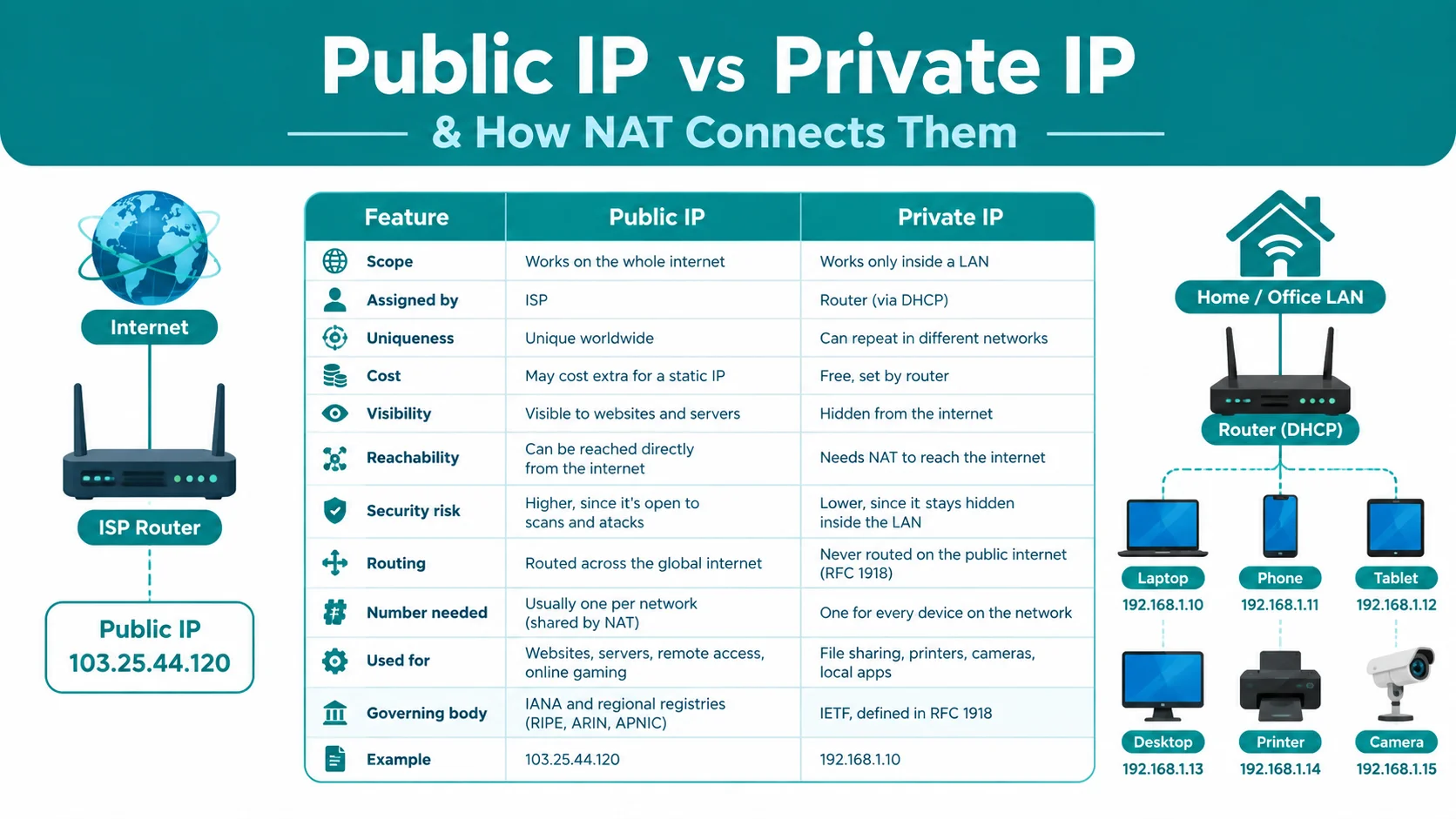
Quick Answer: A public IP address is a unique, globally visible number that your ISP assigns to your router. It identifies your whole network on the internet. A private IP address is a local number that your router assigns to each device, like a phone or laptop, inside your home or office network. NAT (Network Address Translation) connects the two. It lets many private IPs share one public IP when they go online.
Every device that connects to a network needs an address. This address is called an IP address. But not all IP addresses work the same way. Some are public. Some are private.
As a computer science teacher, I explain this topic in every networking class. Students often mix up public IP and private IP addresses. But once you see a real example, the idea becomes very clear.
Private and public IP assignment works seamlessly regardless of your physical connection type. Read our detailed comparison on Wired vs Wireless Networks to learn how data travels across local connections.
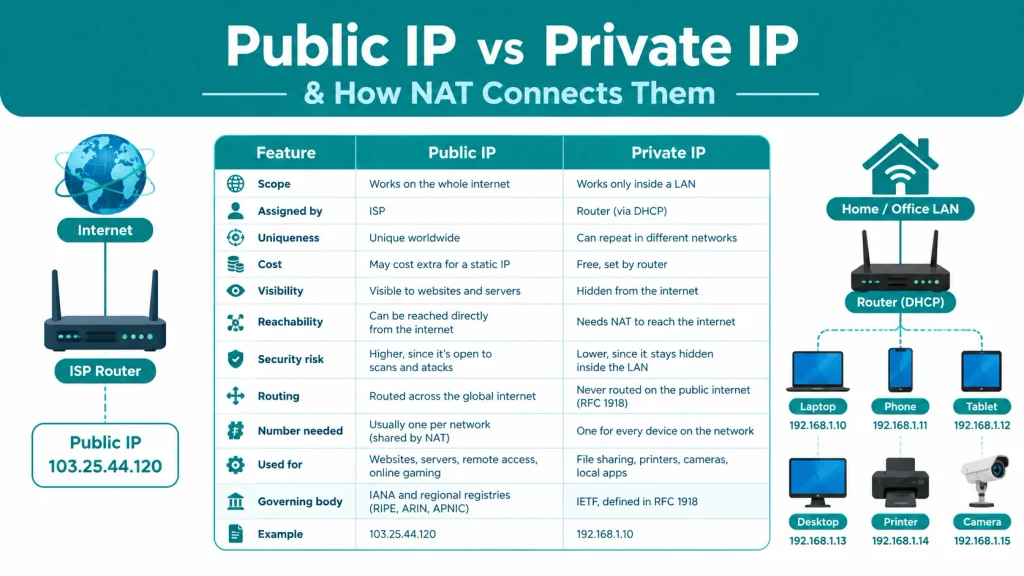
Differences Between Public IP and Private IP
Here is a quick comparison table to make things clear:
| Feature | Public IP | Private IP |
|---|---|---|
| Scope | Works on the whole internet | Works only inside a LAN |
| Assigned by | ISP | Router (via DHCP) |
| Uniqueness | Unique worldwide | Can repeat in different networks |
| Cost | May cost extra for a static IP | Free, set by router |
| Visibility | Visible to websites and servers | Hidden from the internet |
| Reachability | Can be reached directly from the internet | Needs NAT to reach the internet |
| Security risk | Higher, since it’s open to scans and attacks | Lower, since it stays hidden inside the LAN |
| Routing | Routed across the global internet | Never routed on the public internet (RFC 1918) |
| Number needed | Usually one per network (shared by NAT) | One for every device on the network |
| Used for | Websites, servers, remote access, online gaming | File sharing, printers, cameras, local apps |
| Governing body | IANA and regional registries (RIPE, ARIN, APNIC) | IETF, defined in RFC 1918 |
| Example | 103.25.44.120 | 192.168.1.10 |
What is an IP Address and How Does It Work?
An IP address (Internet Protocol address) is a unique number given to a device on a network. This number helps devices find each other and send data.
Think of it like a home address. When someone sends you a letter, the postman needs your address to deliver it. In the same way, data packets need an IP address to reach the right device.
There are two main types of IP addresses:
- IPv4: Uses numbers like 192.168.1.1. It has about 4.3 billion addresses.
- IPv6: Uses longer addresses like 2001:db8::1. It was made because IPv4 addresses ran out.
IPv4 addresses got fully used up years ago. This is called IPv4 address exhaustion. That is one big reason why private IP addresses and NAT became so important. They let many devices share a small number of public IPs.
IP addresses also split into two groups based on where they work:
- Private IP address – works only inside a local network
- Public IP address – works on the open internet
An IP address works at the Network Layer (Layer 3) of the networking model. To understand how data moves through all layers, read our guide on the 7 layers of OSI model.
What is a Private IP Address and Why Do We Need It?
A private IP address is an address used inside a home, office, or school network. It is also called a local IP address.
Private IPs do not work on the internet. A website cannot send data directly to a private IP. That is because private IP ranges are not routable on the public internet. Internet routers simply drop any packet going to these addresses.
Here is what makes private IPs useful:
- Every device in your home (phone, laptop, smart TV) gets its own private IP
- The same private IP range can repeat in millions of homes without any conflict
- Your router assigns these addresses automatically using DHCP (Dynamic Host Configuration Protocol)
I always tell my students: two neighbors’ Wi-Fi networks can both use 192.168.1.5 for a laptop. This does not cause any problem. That’s because these addresses stay local to each network.
Common Private IP Ranges (192.168.x.x, 10.x.x.x)
The private IP ranges come from a rule called RFC 1918. This rule was set by the Internet Engineering Task Force (IETF) in 1996. It reserves three address blocks only for private use:
- 10.0.0.0 – 10.255.255.255 (used by large networks and cloud systems like AWS)
- 172.16.0.0 – 172.31.255.255 (used by medium-size business networks)
- 192.168.0.0 – 192.168.255.255 (used in most home Wi-Fi routers)
Most home routers use the 192.168.x.x range by default. That’s why your phone or laptop often shows an IP like 192.168.1.10 or 192.168.0.5.
There is one more range worth knowing:
- 100.64.0.0/10 – used for Carrier-Grade NAT (CGNAT). Many mobile and broadband ISPs use this range to manage IPv4 shortage between the ISP and your home router.
What is a Public IP Address and Who Assigns It?
A public IP address is the address your network uses to talk to the rest of the internet. It is unique across the whole world. No two devices on the internet can have the same public IP at the same time.
When you visit a website, your request travels using your public IP. The website’s server sees this public IP and sends the data back to it.
Key facts about public IP addresses:
- They are visible to websites, apps, and other users online
- They can reveal your rough location (city or region), not your exact address
- One public IP usually represents your whole home network, not one single device
Role of ISP in Public IP Assignment
Your Internet Service Provider (ISP) gives you the public IP address. This happens when your router connects to the ISP’s network.
Public IPs come in two types:
- Dynamic IP: Changes from time to time. Most home users get this type. It’s cheaper for the ISP to manage.
- Static IP: Stays the same all the time. Businesses, servers, and websites usually use this type, often for an extra fee.
If you restart your router, your ISP may give you a new dynamic public IP. This is normal and does not affect your daily browsing.
Global Internet Identification
A public IP works like your network’s passport on the internet. Every request you send online carries this address so that:
- Servers know where to send the reply
- Websites can log basic connection details
- Network security tools can track traffic patterns
Public IPs are managed by global bodies like IANA (Internet Assigned Numbers Authority) and regional registries such as RIPE, ARIN, and APNIC. These groups make sure no two networks in the world get the same public IP block.
How NAT Bridges Public and Private IPs
Here is the real question students ask: if private IPs cannot reach the internet, how does a laptop with a private IP still browse websites?
The answer is NAT (Network Address Translation).
NAT is a process that runs on your router. It works like this:
- Your laptop sends a request using its private IP (like 192.168.1.10).
- The router receives this request.
- The router replaces the private IP with its own public IP before sending it to the internet.
- When the reply comes back, the router matches it to the right device and forwards it using the private IP again.
This is how one public IP can serve many devices at home at the same time. Without NAT, every single device would need its own public IP. That would be very expensive and impossible, given how limited IPv4 addresses are.
A related term is PAT (Port Address Translation). PAT is a type of NAT that also tracks port numbers. This lets many devices share one public IP without mixing up their data streams. Almost every home router today uses NAT with PAT together.
Static vs Dynamic IP Addresses
Both public and private IPs can be static or dynamic.
- Dynamic IP: The router or ISP changes it after some time. Most home networks use dynamic IPs for both public and private addresses.
- Static IP: It stays fixed. Businesses use static public IPs for servers, email systems, and remote access. Static private IPs are common for printers or security cameras, so they are easy to find each time.
In my networking lab, we always set a static private IP for the classroom server. This way, students connect to the same address every class, without checking it again.
How to Find Your Public and Private IP Address
You don’t need any special tool to check your IP address. Here is how:
To find your private IP:
- Windows: Open Command Prompt, type
ipconfig, and press Enter - Mac: Open Terminal, type
ifconfig, and press Enter - Phone: Go to Wi-Fi settings and tap on your connected network
To find your public IP:
- Search “what is my IP” on Google, and it shows your public IP directly
- Or visit a site like whatismyip.com
This small exercise helps students see the difference live. I ask my class to check both addresses side by side. They are always surprised that the two numbers look completely different.
Frequently Asked Questions
Can a private IP address connect to the internet directly?
No. A private IP needs NAT on the router to reach the internet. It cannot connect on its own.
Why do many homes use 192.168.1.1 as the router address?
It’s a common default setting from router manufacturers. Since it’s a private IP, thousands of routers can use the same address without any conflict.
Is a private IP address safe from hackers?
It is safer than a public IP because it’s hidden behind NAT. But it is not attacker-proof. Devices on the same local network can still see each other.