
Quick Answer:
Telnet is an old remote access tool that uses port 23 and sends all data in plain text, so anyone on the network can read your password. SSH uses port 22 and encrypts everything. Use SSH-2 for all real work. Keep Telnet only for isolated labs or old devices.
Telnet and SSH both let you control a remote computer, router, or switch from your keyboard. Telnet sends everything as plain text. SSH encrypts everything. In 2026, SSH is the standard choice, and Telnet is only for rare lab tests. Whether you are configuring routers on Wired or Wireless Networks, always use SSH instead of Telnet to encrypt your login credentials.
This guide explains how both protocols work, why SSH is safer, and how to manage routers and servers with PuTTY.
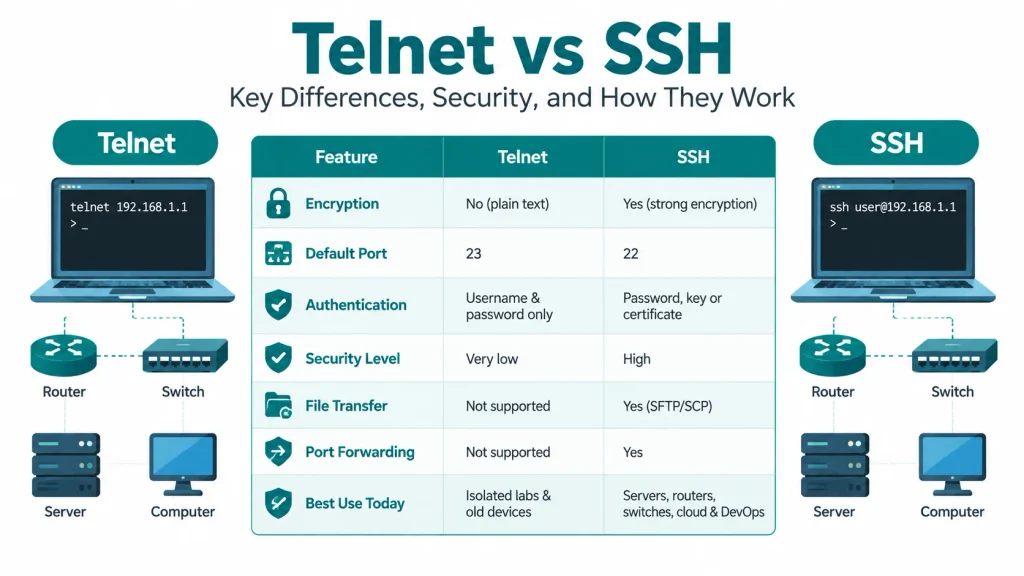
Difference Between Telnet and SSH
| Feature | Telnet | SSH |
|---|---|---|
| Full name | Teletype Network | Secure Shell |
| Default port | 23 (TCP) | 22 (TCP) |
| Created | 1983 (RFC 854) | 1995; SSH-2 in 2006 (RFC 4251 to 4254) |
| Encryption | None | Strong encryption |
| Data type on the wire | Plain text | Encrypted data |
| Login methods | Username and password only | Password, public key, or certificate |
| Server identity check | No | Yes, with host keys |
| Data integrity check | No | Yes, changes are detected |
| Protection from sniffing | None | High |
| Protection from man-in-the-middle attacks | None | Yes |
| Protection from session hijacking | Weak | Strong |
| File transfer | Not supported | Yes (SFTP and SCP) |
| Port forwarding (tunneling) | Not supported | Yes |
| Automation safety | Risky, because passwords travel in plain text | Safe with key-based login |
| CPU use | Slightly lower | Slightly higher, but hard to notice |
| Built into Windows 10 and 11 | Client is off by default | OpenSSH client is available |
| Safe on the internet | No | Yes |
| Best use today | Isolated labs and old devices | Servers, routers, switches, cloud, and DevOps |
| Overall security level | Very low | High |
Use SSH for real work. Use Telnet only when a device supports nothing else, and only inside an isolated network.
What Is Telnet and How Does It Work?
Telnet is an old remote access protocol from 1983 that uses TCP port 23 and sends all data without encryption.
It is defined in RFC 854. It was built when networks were small and trusted. Nobody thought about hackers listening on the wire, so Telnet has no built-in security.
How Does Telnet Send Data in Plain Text?
Telnet sends every key you press exactly as you type it, including your username and password, with no protection.
Here is what happens during a Telnet login:
- Your client opens a TCP connection to port 23.
- The server asks for a username.
- You type it, and it travels as readable text.
- The server asks for a password.
- You type it, and it also travels as readable text.
Anyone on the same network path can read this data. A free tool like Wireshark can show your password in a packet capture. Try this in a safe lab. Capture a Telnet session and open the packet details. You see the password in seconds.
What Are the Security Risks of Using Telnet?
Telnet is risky because attackers can read, change, or take over your session without any special skill.
The main risks are:
- Packet sniffing: Attackers read your username, password, and commands.
- Man-in-the-middle attacks: Attackers sit between you and the device and change the data.
- Session hijacking: Attackers take over an active session.
- No server identity check: You cannot prove you are talking to the real device.
- Weak default logins on IoT devices: The Mirai botnet in 2016 infected many cameras and routers by trying default Telnet passwords.
Security agencies such as CISA advise turning off Telnet and using encrypted options. Windows also keeps its Telnet client switched off by default.
What Is Secure Shell (SSH)?
SSH is a remote access protocol that encrypts every session and uses TCP port 22 by default.
A Finnish researcher named Tatu Ylönen created SSH in 1995. He built it after a password-sniffing attack hit his university network. The current version is SSH-2, defined in RFC 4251 to RFC 4254 (2006). SSH-1 is old and unsafe, so never use it.
SSH does more than Telnet. It also supports:
- SFTP and SCP for secure file transfer
- Port forwarding (tunneling) for other traffic
- Public key login instead of passwords
- Jump hosts to reach private networks
How Does SSH Encrypt Your Connection?
SSH checks the server identity, creates a shared secret key, and then encrypts all traffic with that key.
SSH protects the whole session in three steps:
- Server check: The server shows its host key. Your client compares it with a saved key to confirm the server is real.
- Key exchange: Both sides create a shared secret key without sending it over the network.
- Encrypted session: Every command, password, and output is encrypted with that key. Each packet also gets an integrity check, so changes are detected.
A network sniffer only sees random-looking data. Each packet also gets an integrity check, so any change is detected.
Newer OpenSSH versions also add post-quantum key exchange. OpenSSH 10.0 made a hybrid post-quantum method the default. This helps protect today’s traffic from future quantum computers.
Why Is SSH Key-Based Login Better Than a Password?
Key-based login uses a private key and a public key, so there is no password for attackers to guess or steal.
- The public key stays on the server.
- The private key stays on your computer.
- The server sends a challenge, and only your private key can answer it.
Use Ed25519 keys. Protect your private key with a passphrase and never share it.
What Is Remote Command-Line Access?
Remote command-line access lets you type commands on your computer and run them on another device over a network.
The other device can be a Linux server, a Cisco router, or a network switch. You use it to:
- Change device settings
- Restart services
- Check logs
- Fix problems without visiting the device
The two classic tools for this are Telnet and Secure Shell (SSH). Both use a client-server model. Your computer is the client. The remote device is the server, and it listens on a TCP port.
Is Telnet Faster Than SSH?
Telnet uses slightly less CPU because it has no encryption, but the speed difference is tiny on modern hardware.
For typing commands, you cannot feel any difference. Modern CPUs have hardware support for encryption, such as AES-NI. Very old routers with weak processors may slow down with SSH, but this is rare.
The small speed gain is not worth the risk. A fast but unsafe connection still exposes your passwords.
How Does SSH Help With Automation in DevOps and Networking?
SSH lets scripts and tools log in to many devices securely, without a person typing passwords.
Common tools that use SSH include:
- Ansible: Manages Linux servers over SSH by default.
- Paramiko: A Python library that speaks SSH-2.
- Netmiko: A Python library built on Paramiko for network devices like Cisco routers.
You can script Telnet too. Netmiko and Expect support it. But Telnet sends passwords in plain text, so automation over Telnet puts many devices at risk at once. With SSH, you use keys, and your scripts stay safe.
What Is the Difference Between SFTP, FTP, and Telnet for File Transfer?
Telnet cannot transfer files, FTP sends data in plain text, and SFTP transfers files securely over SSH.
- Telnet: It is only for terminal sessions.
- FTP: It uses port 21 and sends your login in plain text.
- SFTP: It runs inside SSH on port 22 and encrypts everything.
- SCP: It copies files over SSH with a simple command.
Do not confuse SFTP with FTPS. FTPS is FTP wrapped in TLS, which is a different protocol. PuTTY includes PSFTP and PSCP for these tasks.
How Do You Manage Routers and Servers Using PuTTY?
PuTTY is a free Windows client that connects to routers and servers using SSH, Telnet, or a serial cable.
Simon Tatham created PuTTY. The latest release is version 0.85, from 2026-08-16. Download it only from the official PuTTY site and check the signature.
PuTTY also includes:
- PuTTYgen creates SSH key pairs.
- Pageant holds your keys in memory for easy login.
- Plink runs commands from the command line.
- PSCP and PSFTP transfer files securely.
How Do You Connect to a Server with PuTTY?
Enter the server IP, choose SSH on port 22, click Open, and log in with your password or private key.
- Open PuTTY.
- Type the server IP address in Host Name.
- Set the port to 22 and choose SSH.
- Click Open.
- Accept the host key warning only if you trust the server.
- Enter your username and password, or select your private key under Connection > SSH > Auth.
Save the settings under Saved Sessions to reconnect fast.