
Star topology is one of the most common and reliable ways to connect computers in a network. In this design, all nodes (computers, printers, etc.) are connected to a single central hub or switch. Think of it like a star shape, where the central switch is the core, and all devices are the points radiating from it.
Definition of Star Topology
Star topology is a network architecture where each individual node is connected directly to a central device. This central device acts as a communication hub, managing all data flow between connected devices. Because it resembles a wheel with spokes, it is also frequently called a “hub-and-spoke” network topology.
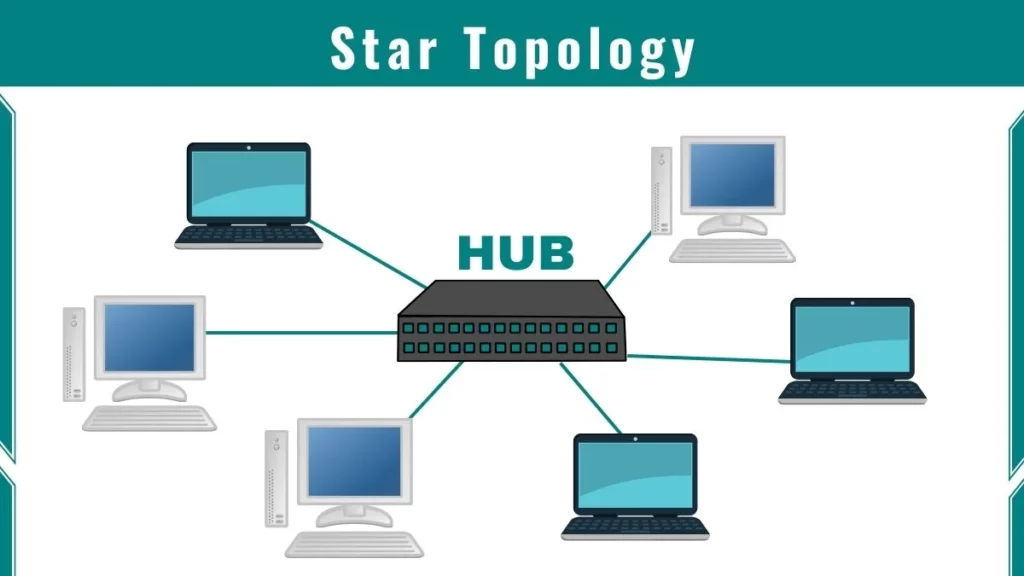
Structure of Star Topology
Here is the step-by-step structure of star topology:
1. Central Device
In star topology, there is a central device like a hub or a switch. This device manages the entire network and controls the flow of data between connected devices. A network cannot function if the central device fails or is missing.
2. Connection of Devices
Each computer or device in the network connects directly to the central device using dedicated cables. This means devices do not share cables, which significantly reduces data collisions and errors compared to a Bus Topology.
3. Data Transmission
When a device sends data, it travels to the central device first. The central device identifies the destination and forwards the data only to the target computer. For example, if Computer A wants to send a file to Computer B, the hub ensures the data reaches Computer B accurately.
4. Independent Device Links
Each device works independently. If one cable breaks, it does not affect the communication of other devices. This makes star topology much more reliable than a Ring Topology, where a single break can take down the entire network.
5. Single Point of Failure
The central switch is critical. If it stops working, the whole network fails. This is known as a “Single Point of Failure.” Therefore, it is important to keep the switch in good condition to maintain network stability.
⭐ Star Topology Simulator — Learn by Doing
Step through how star networks work, test failures, then compare with other topologies
Tap any device or link to fail it
All devices communicate through the central hub/switch. Tap any node or link to fail it and see what happens. Try switching between Hub mode and Switch mode to see the difference.
- Sandbox ready — network healthy0s
Hub: When PC-1 sends data, the hub broadcasts it to ALL devices. Every PC receives the data even if it was not meant for them. This wastes bandwidth and creates security concerns.
Switch: A switch is smarter. It learns which device is connected to which port and sends data only to the target device. This improves speed, security, and reduces unnecessary traffic. Almost all modern networks use switches, not hubs.
| Feature | Star | Bus | Ring | Tree | Mesh |
|---|---|---|---|---|---|
| Center failure | Full outage | Full outage | Full outage | Full outage | No outage |
| Device failure | No impact | Network splits | Network breaks | Subtree lost | No impact |
| Setup cost | Medium | Low | Low | Medium | Very High |
| Performance | High (switch) | Low | Medium | Medium | Very High |
| Fault detection | Easy | Hard | Medium | Easy | Easy |
| Most common use | Home/Office LAN | Old Ethernet | FDDI/Token | Corporate LAN | Internet/WAN |
Star Topology in Computer Network
This topology is widely used in modern computer networks. This is especially used in offices and homes. The central hub acts as a communication point. It receives data from one node and transmits it to the intended destination node. Each node has a direct connection to the hub, making it easy to add or remove devices without disrupting the entire network.
Star Topology Network Used For
Star topology is the industry standard for modern Local Area Networks (LANs) because of its efficiency and ease of management.
- Corporate and Office Networks: IT teams prefer this setup because it is easy to isolate problems. If a specific node isn’t working, you know exactly which cable to check at the central switch.
- Client-Server Networks: It is widely deployed where multiple clients need to connect to a central server for resources.
- Real-time Applications: Due to efficient data transmission, it is ideal for high-bandwidth tasks like video conferencing and online gaming.
- Scalability: You can easily add or remove devices without disrupting the rest of the network. This flexibility makes it more scalable than a Mesh Topology, which can get very complex.
- Multi-Floor Buildings: For larger environments, star networks can be linked together to form a Tree Topology, which provides better control over multi-level structures.
Advantages and Disadvantages of Star Topology
Advantages
- Easy Troubleshooting: Problems are easy to isolate to a specific cable or node.
- High Reliability: A failure in one cable does not affect other nodes.
- Simple Management: Centralized control makes monitoring traffic straightforward.
Disadvantages
- Single Point of Failure: If the central hub fails, the network goes down.
- Cost: It can be expensive due to the requirement for a separate cable for every single device.
FAQs
Why is Star topology better than Bus topology?
In Bus Topology, all devices share a single cable, causing data collisions. In Star topology, every device has a dedicated cable, which prevents collisions and makes the network much faster and more reliable.
Can I use Star topology for home Wi-Fi?
Yes! Your home Wi-Fi router acts as the “Central Hub” (Star topology). Your phone, laptop, and smart TV are all individual nodes connected to that single central device.
What should I do if a computer isn’t connecting in a Star network?
First, check the cable connection at both ends. If the cable is fine, check if the specific port on the central switch is active. If the port light is off, the switch port might be faulty or disabled.