
Tree topology is also known as hierarchical topology. It is a fundamental concept in computer networks and data structures.
What is Tree Topology?
Tree topology is a network structure that looks like the branches of a tree. In this setup, devices are connected in a hierarchical way, with one central “root” node at the top. All other devices are connected to this root node through different levels of “parent” and “child” nodes. This structure allows for efficient data flow and organization within a network.
Tree Topology Definition
A tree topology can be defined as a network architecture where multiple nodes are connected in a branching hierarchy, starting from a single root node. Every node (except the root) has one parent node, and it can have multiple child nodes. This creates a structure that looks like an inverted tree.
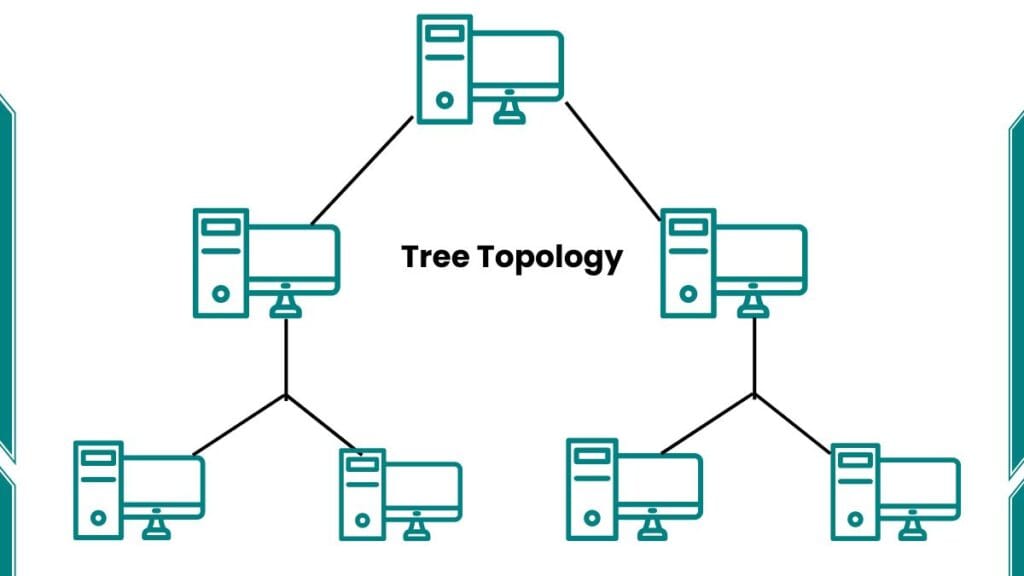
Types of Tree Topology
There are several types of tree topologies based on how nodes are branched:
- Binary Tree: Each parent node has a maximum of two child nodes.
- Ternary Tree: Each parent node can have up to three child nodes.
- N-ary Tree: Each parent node can have any number of child nodes. This is the most flexible type.
- Fat Tree: Fat tree designs are specifically chosen for massive cloud data centers to prevent bottlenecking.
Network Tree Topology Examples
Tree topologies are commonly used in various network setups. Some examples include:
- Corporate networks: Large companies often use tree topologies to organize their departments and branches.
- Cable TV networks: The signal is distributed from a central location to various neighborhoods and then to individual homes.
- File systems: Computer file systems often use a tree structure to organize folders and files.
How Does Tree Topology Work?
The tree topology follows a top-down flow of data. If you are comparing this with other structures, you might find that it behaves like a combination of Star Topology and Bus Topology. Here’s a simple breakdown of how it works:
- Main Device: There’s one main device at the top, like the grandparent of the family.
- Connected Devices: Other devices connect to this main one, like children in a family.
- More Connections: These ‘child’ devices can have their connections, like grandchildren.
- Branching Out: This keeps going, with each device potentially connecting to more devices below it.
- One-Way Connections: Each device (except the main one) only connects to one device above it, just like how a child has one set of parents.
- Many Lower Connections: Each device can connect to many devices below it, like how parents can have many children.
- Tree-Like Shape: When you draw this out, it looks like a tree turned upside down.
This hierarchical structure allows for efficient data transmission and helps manage large networks.
Practical Example (40 Computers Setup)
If you have an office with 4 floors and 10 computers on each floor, you can use a tree topology. You would have one main switch (root) on the ground floor connected to 4 secondary switches (one on each floor). Each secondary switch then connects to the 10 computers on its floor. This hierarchical approach is much more organized than a flat Mesh Topology, which would be too complex for such a setup.
🌳 Tree Topology Simulator — Learn by Doing
Step through how hierarchical networks work, then explore failures on your own
Tap any node or link to fail it
The network is fully operational. Tap any node or link on the diagram to simulate a failure and see which parts of the network get isolated.
- Sandbox ready — network healthy0s
- 🏗️Easy to expand — just add a branch
- 🔍Faults are easy to isolate and find
- 📦Manages large networks in segments
- 🏢Matches real office/building layouts
- 🔧Each branch works independently
- 👑Root node failure = entire network down
- 🌿Branch node failure = whole subtree isolated
- 💸More cable needed than bus topology
- ⚙️Harder to configure than simple topologies
- 📈Performance drops as tree grows deeper
| Feature | Tree | Star | Bus | Ring | Mesh |
|---|---|---|---|---|---|
| Scalability | High | Medium | Low | Medium | Very High |
| Fault tolerance | Medium | Medium | Low | Low | Very High |
| Root/hub failure | Full outage | Full outage | Full outage | Full outage | No outage |
| Cable needed | Medium | Medium | Very Low | Low | Very High |
| Setup complexity | Medium | Simple | Simple | Medium | Complex |
| Real-world use | Corporate LAN | Home/Office | Old Ethernet | FDDI/MANs | Internet/WAN |
Advantages and Disadvantages of a Tree Topology
Here are some tree topology advantages and disadvantages:
Advantages
- Easy Expansion: You can easily add new branches or nodes to the existing network without disrupting the entire system.
- Efficient Management: Because the network is divided into levels, it is very easy to find and fix faults (troubleshooting).
- Scalability: It is perfect for large organizations, universities, or big office buildings where thousands of devices need to be connected.
- Structured Data Flow: It provides a clear path for data, which reduces collisions compared to simple bus topology.
Disadvantages
- Single Point of Failure: If the main root node fails, the entire network will go down.
- Cable Complexity: As the network grows larger, the amount of cabling required increases, similar to the management challenges seen in Ring Topology.
- Maintenance: Managing a large hierarchical network requires a professional network administrator.
Star vs Tree Topology
| Feature | Star Topology | Tree Topology |
| Structure | Single central hub | Multi-level hierarchy |
| Scalability | Limited | High (Very scalable) |
| Best For | Small offices/homes | Large organizations |
| Fault Isolation | Easy | Very easy (by branch) |
Frequently Asked Questions (FAQs)
Is Tree topology a hybrid topology?
Yes, it is considered a hybrid because it combines elements of both star and bus topologies.
What happens if a branch node fails?
Only the devices connected to that specific branch will lose connection. The rest of the network remains functional.
What is the main difference between tree and mesh topology?
In a tree topology, devices follow a hierarchy. In a mesh topology, every device is connected to every other device, which makes mesh much more expensive and complex.