
Quick Summary (TL;DR): The primary difference between system software and application software is that system software manages computer hardware and operates in the background (e.g., Windows, macOS, Linux), while application software runs on top of the operating system to perform specific end-user tasks (e.g., Google Chrome, Microsoft Word, Photoshop).
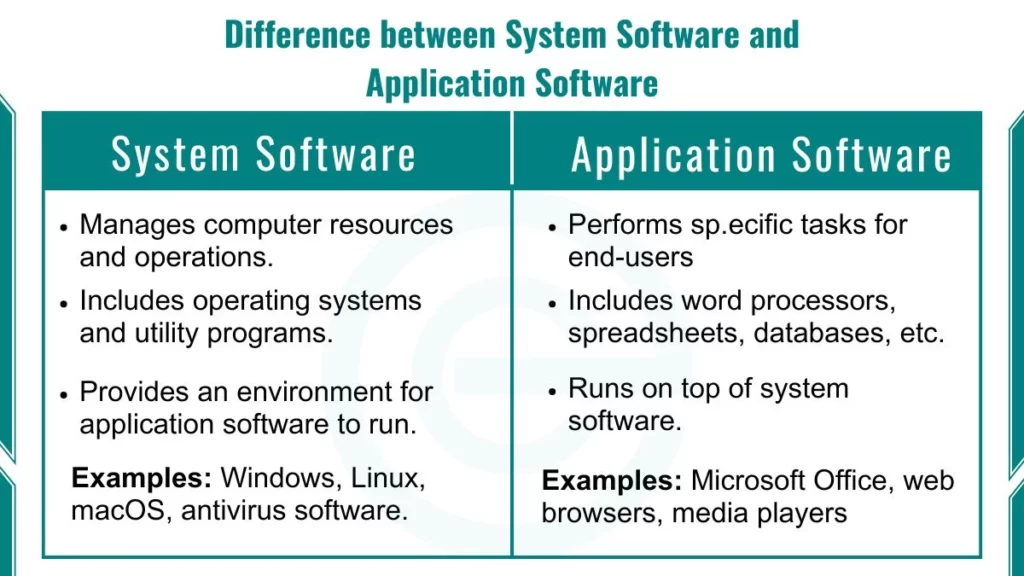
What are the Differences Between System Software and Application Software
There are 10 main differences between system software and application software. They cover purpose, users, dependencies, runtime, interaction, language, development, hardware link, installation, and examples.
| Feature | System Software | Application Software |
|---|---|---|
| Purpose | Runs the computer | Completes user tasks |
| Main users | Computer, system programmers | End users |
| Dependency | Needed for the computer to work | Needs system software |
| Run time | Starts at boot, stays active | Runs when opened |
| User interaction | Mostly background | High, with a friendly interface |
| Languages | C, C++, assembly | Java, Python, C#, JavaScript, Swift, Kotlin |
| Development | Complex | Simpler |
| Hardware link | Tightly tied | Mostly independent |
| Installation | Pre-installed | Optional |
| Examples | Windows, Linux, BIOS | Word, Chrome, VLC |
Hands-On Lab Test: The Task Manager Experiment
In my CS lab sessions, I demonstrate the difference between system software and application software using a simple hands-on exercise on Windows:
- Press
Ctrl + Shift + Escto open Task Manager.- Observe the two distinct sections: “Apps” and “Background processes”.
- Force-close an app like Google Chrome under “Apps”. The application terminates instantly, but your system continues running normally.
- Attempting to terminate a critical Windows System Process (like System or Local Security Authority Process) triggers a system warning or instantly crashes the OS into a Blue Screen (BSOD).
This practical test highlights why system software is critical for computer stability, while application software operates in an isolated environment.
What Is System Software and How Does It Differ from Application Software?
System software is a set of programs that controls computer hardware and provides a platform for application software. It is called low-level software because it works close to the hardware.
It also creates the environment that lets applications run smoothly. Without it, your apps would have no way to talk to the CPU, memory, or storage.
To read more, check our detailed guide on What is System Software.
What Is Application Software and How Does It Differ from System Software?
Application software is a program built to help users do a specific task. It is also called end-user software and runs on top of system software. It does not control hardware. It asks the system software to do that.
You use application software every day. Writing a document, checking email, and watching a video all need an app.
To read more, check our detailed guide on What is Application Software.
What Are Examples of System Software and Application Software?
System software examples include Windows, Linux, macOS, and device drivers. Application software examples include Microsoft Word, Google Chrome, Photoshop, and VLC Media Player.
| Category | System Software Examples | Application Software Examples |
|---|---|---|
| Operating systems | Windows 11, Ubuntu, macOS, Android, iOS | Not applicable |
| Hardware control | Printer driver, graphics driver, BIOS | Not applicable |
| Office work | Not applicable | Word, Excel, PowerPoint, Google Docs |
| Internet | Not applicable | Chrome, Firefox, Edge |
| Media | Not applicable | VLC, Spotify, Photoshop |
| Maintenance | Antivirus, disk cleanup, backup tool | Not applicable |
| Programming | Compiler, interpreter, assembler | VS Code, PyCharm (the editor, not the compiler) |
How Do System Software and Application Software Work Together?
Application software sends requests to the operating system. The OS uses device drivers to control the hardware and returns the result to the app. This teamwork makes both types interdependent.
Here is a simple example. You click Save in Microsoft Word.
- Word sends a save request to the operating system.
- The OS finds free space on the storage drive.
- The disk driver writes the file.
- Word shows a “Saved” message.
Word never touches the hard drive directly. This teamwork is why the two types are called interdependent.
You can see this yourself. Open Task Manager in Windows and click the Processes tab. You will see apps like Chrome in one group. You will see Windows processes in another.
What Is Middleware, and Is It System Software or Application Software?
Middleware is software that sits between the operating system and applications and helps them share data. Many books group it with system software. Some call it a separate layer.
Here is a real example. You pay in an online shop. The shop app sends the order to a message queue. The payment service reads it from the queue. The queue is the middleware.
| Middleware type | Real-world use | Examples |
|---|---|---|
| Application server | Runs business applications | Red Hat JBoss EAP, IBM WebSphere |
| Message queue | Passes messages between apps | Apache Kafka, RabbitMQ, IBM MQ |
| Database connectivity | Links apps to databases | ODBC, JDBC |
| API gateway | Manages API requests | Kong, Amazon API Gateway |
Are Virtual Machines, JVM and Docker Containers System Software?
Hypervisors like VMware ESXi, Microsoft Hyper-V, and KVM are system software. The JVM and Docker are runtime or platform layers between the OS and apps. Textbooks differ, so follow your syllabus.
- Hypervisor: Runs many virtual machines on one physical computer.
- JVM: Runs Java bytecode on any operating system.
- Docker container: Packs an app with its libraries. It shares the host OS kernel.
Can Application Software Run Without System Software?
No. Application software cannot run without system software. An app needs the operating system to reach memory, storage, the screen, and the keyboard.
The reverse is different. A computer can boot and run with only system software. But it will not be very useful. That is why you need both.
There is one more point. Apps are built for a specific OS. A Windows .exe file will not run on macOS without extra tools.
Is Utility Software System Software or Application Software?
Utility software is usually treated as a part of system software. It maintains, protects, and optimizes the computer. Examples are antivirus, backup tools, and file compression tools.
But the line is not always sharp. Some books call utilities a separate third type. Some also call them a type of application software. For exams, follow your textbook.
A simple test helps. If the tool serves the computer, it is a utility. If it serves a user task like writing or editing, it is an application.
Real-World Case Study: Driver Failure vs. App Crash
During system maintenance on a client workstation, a corrupted graphics driver caused repeated screen flickers and system freezes (BSOD). Because device drivers run within the Kernel Mode (Ring 0) of system software, a failure directly compromises total system stability.
By contrast, when a web browser like Microsoft Edge hangs due to heavy memory usage, it occurs within User Mode (Ring 3). Terminating the unresponsive tab or process safely restores performance without rebooting the computer. Understanding this privilege-level distinction is key to effective system troubleshooting.
Frequently Asked Questions (FAQs)
Is Android considered system software or application software?
Android is system software because it is an open-source mobile operating system that controls smartphone hardware resources and runs mobile applications.
Is a web browser system software or application software?
A web browser (e.g., Google Chrome, Mozilla Firefox) is application software. It runs on top of an operating system to let users access, view, and interact with web pages.
Is Python system software or application software?
The Python Interpreter is system software (a language translator tool). However, any custom program, script, or application built using Python (such as a GUI calculator) is application software.