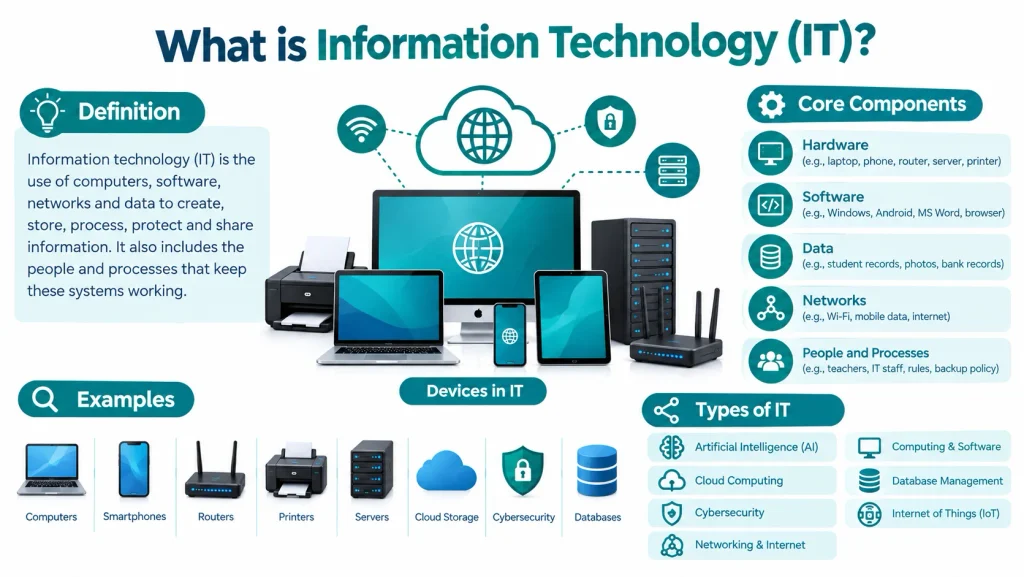
TL;DR: Information technology (IT) is the use of computers, software, networks and data to create, store, process, protect and share information. It has five core components: hardware, software, data, networks, and people and processes.
What Is Information Technology (IT)?
Information technology is the use of computers, storage devices, networks, and software to create, process, store, secure, and share electronic data. It also includes the people and rules that keep these systems working.
Think of your school. The computers, Wi-Fi, grading software and student records are all part of its IT. The IT team keeps them running and safe.
Data vs. information
Many students mix these two up, and they are the basis of this topic.
- Data is raw facts. Example: 85, 72, 90.
- Information is data with meaning. Example: “The student’s average is 82.3.”
- IT turns data into information, then stores it and shares it.
Where the term comes from: The term “information technology” first appeared in Harvard Business Review in 1958. The writers, Harold Leavitt and Thomas Whisler, used it to separate small single-purpose machines from general computers that can do many tasks.
From my classroom: When I ask students “What is IT?”, most say “the internet” or “computers”. Both answers are only part of the truth. I use a platform they already know, like Khan Academy or Google Classroom. I show them that a video, a quiz score and a teacher comment are all data. The servers, the network, the app and the support team are the IT that makes it work. After that example, the definition clicks.
How Did Information Technology Develop Over Time?
IT grew in steps. Each step made computers smaller, faster and easier to use.
| Period | What changed |
|---|---|
| 1940s | Large electronic computers like ENIAC appear |
| 1950s-60s | Mainframe computers serve big companies and governments |
| 1969 | ARPANET, the early form of the internet, starts |
| 1981 | IBM launches its personal computer |
| Early 1990s | The World Wide Web opens to the public |
| 2000s | Search engines, social media and smartphones spread (the iPhone arrives in 2007) |
| 2010s | Cloud computing and mobile apps become normal |
| 2022 onward | AI chatbots reach everyday users |
In the 1960s, only large organizations used computers. Today, a student carries one in a pocket.
What Are the Core Components of Information Technology?
IT has five core components. A system works well only when all five work together.
| Component | What it does | Example |
|---|---|---|
| Hardware | The physical parts you can touch | Laptop, phone, router, server, printer |
| Software | The programs that tell hardware what to do | Windows, Android, MS Word, a browser |
| Data | The facts the system collects and stores | Student records, photos, bank records |
| Networks | The links that connect devices | Wi-Fi, mobile data, the internet |
| People and processes | The users, IT staff and rules | Teachers, administrators, backup policy |
- Hardware includes input devices (keyboard, mouse), output devices (monitor, printer), the processor, memory and storage.
- Software has two main types. System software, like an operating system, runs the computer. Application software, like a browser or a word processor, helps you do a task.
- Networks connect devices so they can share data. A school lab network lets many computers use one printer and one internet line.
- People and processes are the part students often forget. A computer without a trained user or a clear rule is of little use. A weak password rule can break a strong system.
From my classroom: In my lab, the most common problem is not broken hardware. Students forget passwords, save files in the wrong folder, or lose work without a backup. Good habits fix more problems than new devices do.
What Are the Types of Information Technology?
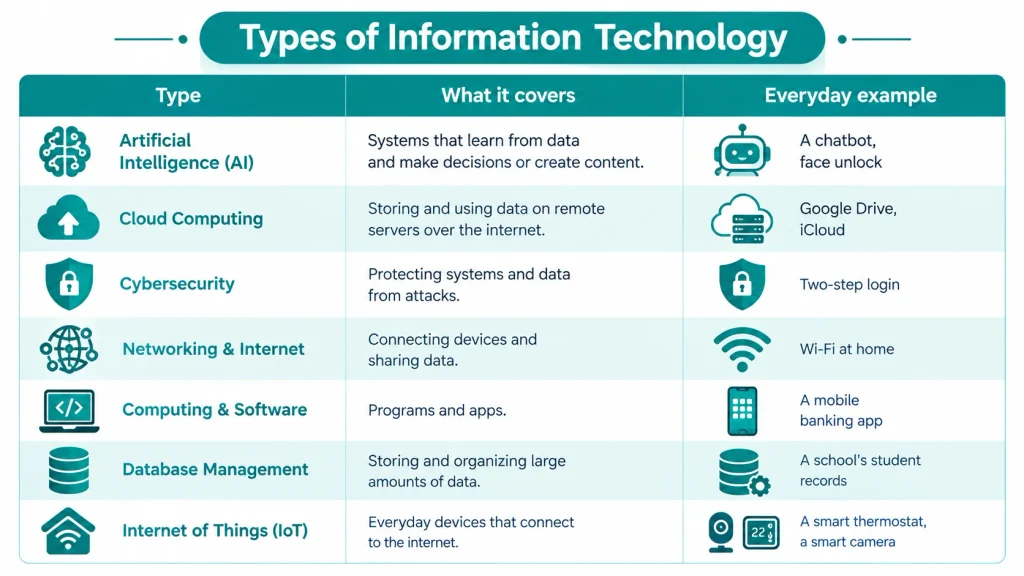
IT covers many areas. The table gives a quick view. The sections after it explain the four most important types of IT.
| Type | What it covers | Everyday example |
|---|---|---|
| Artificial intelligence (AI) | Systems that learn from data and make decisions | A chatbot, face unlock |
| Cloud computing | Storing and using data on remote servers over the internet | Google Drive, iCloud |
| Cybersecurity | Protecting systems and data from attacks | Two-step login |
| Networking and internet | Connecting devices and sharing data | Wi-Fi at home |
| Computing and software | Programs and apps | A mobile banking app |
| Database management | Storing and organizing large amounts of data | A school’s student records |
| Internet of Things (IoT) | Everyday devices that connect to the internet | A smart thermostat, a smart camera |
These types often work together. When you open a banking app, software runs on your phone. A network carries the request, a database finds your record and cybersecurity protects the login.
Artificial Intelligence (AI) in Information Technology?
AI is software that learns patterns from data and uses them to make decisions or create content. Machine learning is its main method. You use AI when you talk to a chatbot, unlock a phone with your face or get a video suggestion.
Cloud Computing in Information Technology?
Cloud computing means using servers on the internet instead of your own computer to store data and run programs. Amazon Web Services, Microsoft Azure, and Google Cloud are the three biggest providers. The cloud has three common service models: IaaS (infrastructure), PaaS (platform) and SaaS (software). Gmail and Google Docs are SaaS examples.
Cybersecurity in Information Technology?
Cybersecurity protects systems, networks and data from attacks, theft and damage. It keeps data private, correct and available. Common tools are firewalls, encryption, antivirus software and multi-factor login. Strong passwords and regular updates stop many attacks.
Networking in Information Technology?
A network connects two or more devices so they can share data and resources. A LAN covers a small area like a school lab. A WAN covers a large area, and the internet is the biggest WAN. Routers, switches and rules called protocols, like TCP/IP, make this work.
From my classroom: I teach these four types together because students see them in one action. When a student uploads homework to Google Classroom, the network carries the file. The cloud stores it, security checks the login, and AI may suggest feedback.
What Are Examples of Information Technology in Daily Life?
You meet IT in almost every part of life. Here are clear examples:
- Education: Khan Academy, Google Classroom, online lectures and digital report cards are IT.
- Banking and payments (US): Zelle sends money between bank accounts. Venmo and PayPal move money between people. Apple Pay lets you pay with your phone.
- Banking and payments (India): UPI lets you pay instantly through apps like Google Pay, PhonePe and Paytm.
- Government services (US): The Social Security Administration’s online account and state DMV websites let people handle records and renewals online.
- Government services (India): The Aadhaar ID system and DigiLocker let people verify identity and store official documents digitally.
- Healthcare: Hospitals use digital records, online appointments and machines that connect to computers.
- Shopping and business: Online stores, digital invoices and delivery tracking all run on IT.
- Communication: Messaging apps, video calls and email connect people.
What Is the Difference Between IT, ICT, and Information Systems (IS)?
These three terms sound alike, so students often mix them up. They overlap, but each has a different focus.
| Point | IT | ICT | Information Systems (IS) |
|---|---|---|---|
| Full form | Information Technology | Information and Communication Technology | Information Systems |
| Main focus | Computers, software, networks and data | IT plus communication tools | How organizations use technology to run their business |
| Includes phones and broadcasting? | Not as a main focus | Yes | Only as a business tool |
| Typical user | IT teams and technicians | Schools, telecom companies, governments | Managers and business analysts |
| Simple example | Setting up a company network | Running a mobile network with internet services | Choosing a system to track company sales |
An easy way to remember:
- IT is the technology.
- ICT is IT plus communication.
- IS is technology plus business needs.
Why Is Information Technology Important?
IT makes work faster and easier to track. It also gives people access to information they could not reach before.
- For individuals: You learn online, find jobs, send money and talk to family far away.
- For businesses: IT helps companies store records, serve customers and sell online.
- For countries: IT creates jobs and brings in income.
The numbers back this up.
In the United States, the Bureau of Labor Statistics (BLS) projects that computer and information technology jobs will grow much faster than the average for all jobs from 2024 to 2034. It expects about 317,700 openings each year. The median yearly pay for this group was $105,990 in May 2024. The median for all jobs was $49,500.
What Is the Difference Between IT, Computer Science, ITES and Software Engineering?
The table makes the difference clear.
| Point | Information Technology (IT) | Computer Science (CS) | ITES (IT-Enabled Services) | Software Engineering (SE) |
|---|---|---|---|---|
| Main focus | Using and managing technology systems | Theory of computing, algorithms and programming | Business services delivered using IT | Designing and building reliable software |
| Core subjects | Networks, databases, security, system management | Algorithms, data structures, maths, programming | Customer support tools, data handling, process skills | Software design, testing, project management |
| Typical work | Set up, maintain and protect systems | Research and build new software methods | Call center, back-office and data processing work | Plan, code, test and release software |
| Typical jobs | Network administrator, IT support, security analyst | Software developer, AI engineer, researcher | Customer support executive, data entry and process associate | Software engineer, QA engineer |
| Maths level | Moderate | Higher | Low | Moderate to high |
A simple rule helps: CS creates the technology, SE builds software products with it, IT manages systems that use it, and ITES delivers business services through it.
From my classroom: Students ask me, “Which one is better?” I ask them one question back: “Do you enjoy building things with code, or do you enjoy setting up and fixing systems?” Their answer usually shows the right path.
What Careers Are Available in Information Technology?
IT offers many jobs. You do not need to be a programmer to work in it.
| Role | What the person does |
|---|---|
| IT support specialist | Helps users fix computer and software problems |
| Network administrator | Builds and maintains computer networks |
| Systems administrator | Manages servers and operating systems |
| Cybersecurity analyst | Finds and stops security threats |
| Database administrator | Organizes, protects and backs up data |
| Cloud engineer | Sets up and manages cloud services |
| Web developer | Builds websites and web apps |
| Data analyst | Studies data to find useful patterns |
Cybersecurity is one of the fastest-growing areas. The BLS projects 29% job growth for information security analysts from 2024 to 2034. Their median pay was $124,910 in May 2024.
What Are the Best Entry-Level IT Certifications to Start a Career in 2026?
A certification proves a basic skill to employers. These four are popular in both the US and India for beginners.
- CompTIA A+: This is the classic starting point for help desk and IT support jobs. It needs two exams, Core 1 (220-1201) and Core 2 (220-1202). They cover hardware, operating systems, networking, security and troubleshooting.
- Cisco CCNA (exam 200-301): This certification covers networking basics, IP addressing, network security and automation. It suits students who want to become network administrators.
- AWS Certified Cloud Practitioner (exam CLF-C02): This certification covers cloud basics, AWS services, security and billing. It suits beginners who want to enter cloud computing.
- Google IT Support Professional Certificate: This is an online beginner course. It teaches troubleshooting, networking, operating systems, system administration and security. It needs no earlier IT experience.
My advice: Start with the one that matches the job you want.
- IT support: A+ or the Google certificate.
- Networking: CCNA.
- Cloud: AWS Cloud Practitioner.
A certification works best when you also practice. Build a home lab, set up a small network or run a virtual machine.
What Are the Biggest Challenges Facing Information Technology Today?
IT grows fast, and it faces real problems. These are the main ones in 2026.
- Cybersecurity threats: Attacks like phishing and ransomware target schools, hospitals and companies. Strong passwords, two-step login and regular updates stop many of them.
- Data privacy: Companies collect huge amounts of personal data, and laws now control how they use it. Examples are the GDPR in Europe, state laws such as California’s CCPA in the US, and India’s Digital Personal Data Protection Act of 2023.
- AI and jobs: AI tools now handle tasks like coding help, testing and support chats. The effect is already visible in India. NASSCOM estimates that tech industry revenue grows about 6.1% in fiscal year 2026, while jobs grow only about 2.3%. Workers who learn to use AI tools well stay more valuable.
- Old infrastructure: Many banks, hospitals and government offices still run old systems. These systems are costly to maintain, slow to change and harder to secure. Moving them to modern platforms takes time and money.
What Are the Future Trends in Information Technology?
These trends shape IT in 2026.
- Artificial intelligence: AI tools now help with writing, coding, search and customer support.
- Cloud computing: More schools and companies store data online instead of on local machines.
- Cybersecurity: More systems go online, so protecting data becomes a bigger job.
- 5G and faster internet: Better mobile networks make online work, learning and IoT devices smoother.
- Automation: Software now handles repeated tasks that people once did by hand.
- Quantum computing: This is still at an early stage. It may change fields like security in the future, but it is not part of daily IT work today.
Frequently Asked Questions
Is IT the same as computer science?
No. Computer science focuses on building software, algorithms and computing systems. IT focuses on using, managing and protecting those systems.
What is ITES?
ITES means IT-Enabled Services. It covers business services that companies deliver using IT, such as customer support and data processing. The term is common in India.
Which IT certification is best for beginners?
CompTIA A+ and the Google IT Support Certificate suit support roles. CCNA suits networking. AWS Certified Cloud Practitioner suits cloud basics.