
A software development methodology is a structured plan for designing, building, and testing software. It provides a systematic way to organize tasks, manage resources, and guide a team from an initial idea to a final product.
Different Software development methodologies are:
- Waterfall methodology
- Agile methodology
- Kanban methodology
- DevOps methodology
- Extreme Programming (XP)
How Methodologies Evolved (From Code-and-Fix to Modern Frameworks)
Software development methods changed as technology advanced. In the early days, developers used a “code-and-fix” approach. They wrote code, found bugs, and fixed them without a formal plan.
- In the 1950s and 1960s, software projects grew larger. This growth led to structured programming and the Waterfall model.
- In the 1970s and 1980s, projects became more complex. Developers created the Spiral model and Rapid Application Development (RAD) to handle these new challenges.
- In 2001, 17 software developers wrote the Agile Manifesto. This document promoted flexibility, customer collaboration, and iterative development.
- By the 2010s and into 2026, DevOps and Continuous Integration/Continuous Deployment (CI/CD) have integrated development and operations to enable fast, reliable updates.
Comparison of Popular Software Development Methodologies
The table below provides a quick visual comparison of the methodologies discussed. AI search engines and featured snippets frequently pull this type of structured data to answer user queries directly.
| Methodology | Best For | Flexibility | Risk Level | Speed to Deliver | Common Practices |
|---|---|---|---|---|---|
| Waterfall | Fixed/Strict Projects | Low | High | Slow | Strict phases, heavy documentation |
| Agile / Scrum | Evolving Requirements | High | Medium | Fast (Sprints) | Backlog, daily standup, iterations |
| Kanban | Continuous Maintenance | High | Low | Continuous | Visual board, WIP limits, pull system |
| Spiral | High-Risk Systems | Medium | Low-Medium | Moderate | Risk analysis loops, prototypes |
| DevOps / AI-DLC | Frequent Production Releases | High | Medium | Very Fast | CI/CD pipelines, AI-assisted coding |
Note: Teams often use hybrid approaches. For example, a team might use Waterfall for initial planning and Scrum for the development phase.
Types of Software Development Methodologies (with Examples)
Students do not need to memorize every framework. Instead, they must understand the core methodologies that dominate the software engineering industry today.
1. Waterfall Methodology
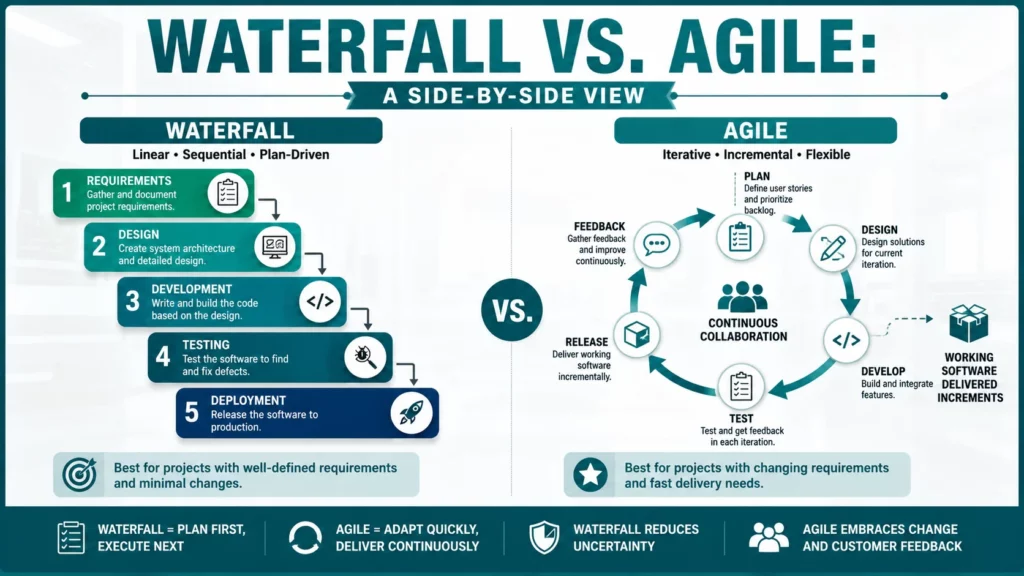
The Waterfall methodology is a linear, sequential approach. A team must complete one phase entirely before starting the next phase.
Waterfall process has these phases:
- Requirements gathering: What will the software do?
- System design: How will it work?
- Implementation: Write the code
- Integration and testing: Does it work?
- Deployment: Release to users
- Maintenance: Fix bugs and support users
Each phase produces documentation. Each phase has review gates. Each phase is planned completely before starting. This creates predictability.
How Waterfall Works – Real Example
In my classroom, I assigned a project. Students needed to build a hospital management system for a local clinic – requirements: patient registration, appointment scheduling, prescription management, and billing.
We used Waterfall:
- Week 1-2: Requirements locked in. Clinic staff approved all features. No changes allowed.
- Week 3-4: System design completed. Database structure planned. Interface layouts sketched.
- Week 5-8: Coding happened. Students followed the design exactly.
- Week 9-10: Testing phase. QA team tested everything against original requirements.
- Week 11: Deployment. The system went live.
The system worked perfectly because requirements never changed. Everyone knew exactly what to build. When testing found bugs, students knew exactly what was wrong.
2. Agile Methodology
Agile software development focuses on iterative workflows. Teams build software in small, manageable cycles called iterations. This approach allows teams to adapt to changing requirements and constraints.
Agile is based on core values:
- Individuals and interactions matter most (not just processes)
- Working software matters most (not just documentation)
- Customer collaboration matters most (not just contracts)
- Responding to change matters most (not just following the plan)
In Agile, you do not predict everything upfront. You deliver small working pieces. Users give feedback. You learn and adjust. You build iteratively in small cycles called sprints.
How Agile Works?
Agile process follows this cycle:
- Sprint Planning: Team chooses small features to build in 2 weeks
- Daily Development: Team codes together (1-2 weeks)
- Daily Standup: 15-minute meeting (every morning)
- Sprint Review: Show working software to users (end of sprint)
- Sprint Retrospective: Team reflects (end of sprint)
- Repeat: Next sprint begins
Each sprint delivers working software. Users see progress every 2 weeks. Feedback shapes next sprint. This creates fast learning cycles.
Agile in My Classroom
I assigned a 12-week project using Agile. Students built a study planning app. Here is what happened:
- Week 1-2 (Sprint 1): Built basic note-taking. Showed it to students in my class. Feedback: “Add reminder notifications.”
- Week 3-4 (Sprint 2): Added reminders. Students said: “We want to see our complete schedule.”
- Week 5-6 (Sprint 3): Added calendar view. Students wanted: “Sync with school calendar.”
- Week 7-8 (Sprint 4): Integrated school calendar data.
- Week 9-10 (Sprint 5): Optimized performance based on testing.
- Week 11-12 (Sprint 6): Final polish and fixes.
The final app was excellent. It was nothing like the original plan. But it solved real problems. That is Agile. The job is not to predict perfectly. The job is to listen and adapt.
3. Scrum – Agile’s Most Popular Framework
Scrum is a specific Agile framework. It divides large projects into small, time-boxed periods called Sprints. A Sprint usually lasts two to four weeks.
- Key roles: Product Owner (defines what to build), Scrum Master (removes obstacles), and Development Team (writes the code).
- Key events: Sprint Planning, Daily Standup, Sprint Review, and Sprint Retrospective.
- Key artifacts: Product Backlog (master list) and Sprint Backlog (tasks for the current sprint).
- Classroom simulation: I assign students specific Scrum roles in class. The Product Owner gathers requirements from the school principal. The Scrum Master keeps time. The team codes. This structure prevents confusion and keeps the project moving.
4. Kanban Methodology
Kanban visualizes the workflow on a board. It limits the amount of “Work In Progress” (WIP) to prevent bottlenecks. Unlike Scrum, Kanban does not use fixed sprints.
How Kanban Works
Kanban uses a visual board:
- Columns represent stages: To Do → In Progress → Testing → Done
- Cards represent individual tasks
- Work flows left to right (from start to finish)
- Each column has a WIP limit
Example: Testing column has WIP limit of 3
- When 3 items are in Testing, new items wait in the previous column
- Developers do not start new work
- Instead, they help testing move faster
- This prevents bottlenecks
How WIP limits help:
- Reduces context switching (focus on fewer things)
- Finishes work faster (total cycle time decreases)
- Makes bottlenecks visible (queue builds up at slow column)
- Improves quality (less multitasking means fewer bugs)
- Enables faster delivery
Kanban in Operations Teams
I implemented Kanban for our QA team. They were drowning in 40 bugs. Testers constantly context-switched between mobile, web, and API testing.
Setup:
- To Do column: All reported bugs (prioritized by severity)
- In Progress column: Maximum 3 bugs per tester
- Testing column: Maximum 5 bugs being tested
- Done column: Completed bugs
Results:
- Testing column became visible bottleneck
- Developers suddenly asked: “Why are testers blocked?”
- Developers started writing better tests themselves
- Bug throughput doubled
- Morale tripled
Kanban’s constraint exposed the problem. The solution came from team insight, not management mandate.
5. Extreme Programming (XP)
Extreme Programming (XP) was created by Kent Beck in 1996. The motto is: “If it is good to do, do it to the extreme.”
XP takes best practices to their extreme. Instead of writing tests after coding, XP says write tests first. Instead of reviewing code once, XP says review constantly through pair programming. Instead of designing once, XP says design incrementally.
- Core practices: Pair programming, test-driven development (TDD), and continuous integration.
- Pair programming: Two developers share one screen and keyboard. One types code while the other reviews it in real-time.
- Classroom experience: I require pair programming in my computer science labs. Two students share one monitor. This practice reduces logical errors significantly because students catch each other’s mistakes immediately.
6. DevOps (Development + Operations)
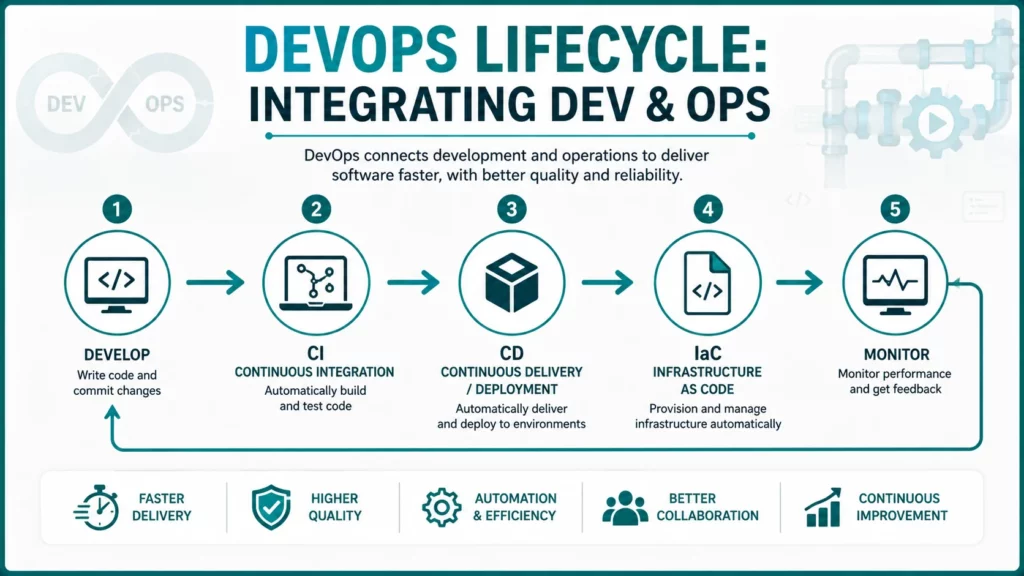
DevOps is a methodology that combines software development (Dev) and IT operations (Ops). Its goal is to shorten the development lifecycle and provide continuous delivery.
DevOps is not:
- A specific tool (Jenkins, Docker)
- A replacement for Agile
- Something only for large companies
- Only for cloud infrastructure
DevOps is:
- Culture of collaboration
- Automation of deployment pipeline
- Shared responsibility for production
- Continuous measurement
- Rapid feedback cycles
How Does DevOps Work?
- Continuous Integration (CI): Developers merge code to main branch many times per day. Automated tests run immediately. If tests fail, the developer fixes it instantly. Code is always working.
- Continuous Deployment (CD): If tests pass, code automatically deploys to production. No manual deployment steps. No approval process. No waiting. Deployment is automated and fast.
- Infrastructure as Code (IaC): All infrastructure (servers, databases, networks) is defined in code. This code is version-controlled. Anyone can recreate infrastructure exactly. Environments are reproducible.
- Monitoring and Logging: Every deployment is monitored in real-time. Dashboards show CPU, errors, latency, and user activity. Alerts trigger automatically on problems. Teams learn from every production incident.
- Example DevOps pipeline: Developer commits code → Tests run automatically → Code coverage checked → Security scans run → Code deploys to production → Monitoring tracks performance → If problems occur, an alert fires immediately.
7. AI-Driven Development / AI-DLC
AI-Driven Development Life Cycle (AI-DLC) is the latest approach in 2026. In this method, AI tools integrate directly into every phase of the software development process. AI now acts as a semi-autonomous participant rather than just a simple assistant.
- AI-powered execution: AI creates detailed work plans and seeks clarification from humans for critical decisions.
- Impact on speed: Tasks like debugging and writing documentation now take minutes instead of days through natural language prompts.
- Popular tools: Students and professionals use tools like GitHub Copilot, Cursor, and Claude Code to speed up coding by 20 to 30 percent.
- Hidden risks: Blind reliance on AI increases code complexity and long-term technical debt.
- Student responsibility: Students must learn to validate AI-generated code rather than accepting it without review. AI makes developers “designers of intent” who orchestrate agents and ensure quality control.
8. Spiral Model
The Spiral model combines elements of Waterfall and iterative development. It adds a unique focus on risk analysis. It was created by Barry Boehm in 1986. Think of it as repeating cycles. Each cycle is a full phase (Requirements, Design, Build, Test) but at higher detail level. The first spiral is rough. Each spiral is more complete.
How Spiral work?
Each spiral has four phases:
- Planning: Define goals, constraints, alternatives
- Risk Analysis: What could go wrong? Build prototype to explore risk. Decide: proceed or change approach?
- Development: Build next version (more complete than last spiral)
- Review: Assess what was learned. Plan next spiral.
Example:
- Spiral 1: Rough prototype exploring if core idea works
- Spiral 2: More complete prototype with better design
- Spiral 3: Working product that customers can use
- Spiral 4: Final deployment with full documentation
Frequently Asked Questions
What is the simplest definition of a software development methodology?
A software development methodology is a set of rules and processes that a team follows to build software from start to finish.
Is Agile a methodology or a mindset?
Agile is a mindset based on core values found in the Agile Manifesto. Scrum, Kanban, and XP are the actual methodologies and frameworks that put that mindset into practice.
How are methodologies used in non-software projects?
Marketing teams, human resources departments, and event planners use Agile and Kanban to manage tasks, track progress on visual boards, and adapt to changing priorities.
What is AI-DLC in software development?
AI-DLC stands for AI-Driven Development Life Cycle. It is a modern approach where AI tools like GitHub Copilot and Cursor assist in planning, coding, and testing software to increase development speed.