
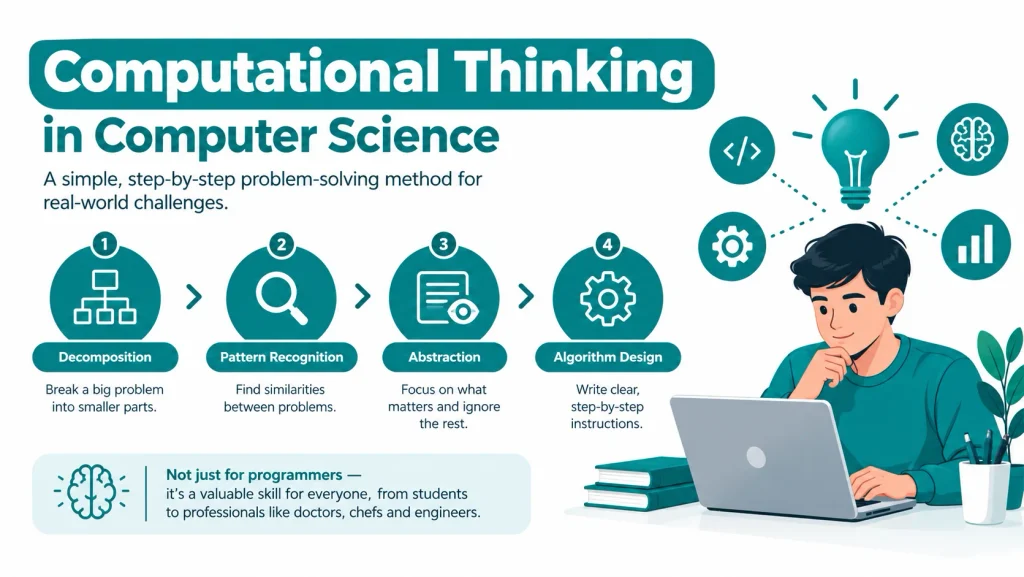
TL;DR / Quick Answer: Computational thinking is a simple, step-by-step problem-solving method that breaks complex challenges into four easy steps. These 4 steps are Decomposition, Pattern Recognition, Abstraction, and Algorithm Design. It is not just for computer programmers but also for professionals like doctors, chefs, and engineers use it every day. In today’s AI-driven world, where AI tools can automatically write code, human logic, planning, and debugging skills are more important than ever.
Introduction to Computational Thinking in Computer Science
Computational thinking is a way to solve problems like a computer scientist. It means you break a hard problem into smaller parts. Then you find patterns. Then you build a clear, step-by-step solution. The term became popular after computer scientist Jeannette Wing wrote about it in 2006. She said computational thinking is a skill everyone should learn, not just programmers.
Today, in 2026, computational thinking is part of school curricula in many countries. Groups like the ISTE (International Society for Technology in Education) and Code.org teach it from primary school onward. It’s no longer just a computer science topic. It is now seen as a core life skill, similar to reading and math.
Core Principles of Computational Thinking
Computational thinking has four main parts. Experts often call these the “four pillars.” Each pillar helps you handle one part of a problem.
- Decomposition – breaking a big problem into small pieces
- Pattern recognition – finding similarities between problems
- Abstraction – focusing on what matters and ignoring the rest
- Algorithm design – writing clear, step-by-step instructions
Let’s look at each one closely.
Breaking Down Complex Problems (Decomposition)
Decomposition means breaking a big problem into smaller, easier pieces. When you face a large task, it feels overwhelming. Your brain gets confused. But when you divide it into tiny steps, everything becomes clear.
For example, imagine you need to create a student attendance system for your school. This is a huge task. But you can break it down:
- First, you collect student information (names, roll numbers, class)
- Second, you record daily attendance
- Third, you calculate attendance percentage
- Fourth, you generate reports for parents
- Fifth, you flag students with low attendance
Now each piece is simple. You can solve each piece separately. Then you put all pieces together to create the complete system.
Pattern Recognition and Data Abstraction
Pattern recognition means you look for similarities in problems. When you recognize a pattern, you can use the same solution for many similar problems.
Imagine you need to write a report about three different topics: a historical event, a scientific discovery, and a sports achievement. At first, these topics seem completely different. But you notice a pattern. Every report needs:
- An introduction
- Background information
- Main events or details
- Why it matters
- A conclusion
Now you have a pattern. You use the same structure for all three reports. This saves time because you don’t create a new format each time.
Pattern recognition helps you identify what’s important and what’s not. This is called data abstraction or generalization. You focus on key information. You ignore unnecessary details.
Developing Systematic Algorithmic Solutions
An algorithm is a set of clear steps to solve a problem. It is like a recipe. You follow the steps in order, and you get the result.
A good algorithm has three qualities:
- It is clear — every step is easy to understand
- It is correct — it gives the right answer every time
- It is efficient — it does not waste time or resources
Here is a simple algorithm to find the largest number in a list:
- Start with the first number as the “largest”
- Compare it with the next number
- If the next number is bigger, make it the new “largest”
- Repeat until you check all numbers
- Return the final “largest” number
This is basic, but it shows how algorithmic thinking works. Every computer program, from a simple calculator to an AI model, is built on algorithms like this.
How to Apply Computational Thinking: A Practical Framework
Now that you understand the four pillars, let’s see how to actually use them. Here’s a practical framework you can apply to any problem:
Step 1: Understand the Problem Fully
Don’t jump to solutions immediately. Take time to understand. Ask questions:
- What exactly is the problem?
- What is the desired outcome?
- What constraints or limitations exist?
- What information do I have?
- What information am I missing?
Step 2: Decompose the Problem
Break the problem into smaller, manageable parts. Write them down. Each part should be solvable independently. Don’t try to solve everything at once.
Step 3: Identify and Recognize Patterns
Look at each small problem. Have you seen similar problems before? What solutions worked? What patterns emerge across different parts of the problem?
Step 4: Generalize and Abstract
Focus on the essential information. Remove unnecessary details. Identify the core pattern that can apply to multiple problems or situations.
Step 5: Design Your Algorithm
Create step-by-step instructions. Write them clearly. Someone else should be able to follow your steps without asking questions. Number each step. Make each step specific and actionable.
Step 6: Evaluate and Optimize
Test your algorithm. Does it produce the correct result? Can you make it faster? Can you make it simpler? Can you use fewer resources? Optimization is continuous.
Step 7: Implement and Learn
Execute your solution. Monitor the results. Learn from what worked and what didn’t. Adjust for next time.
Practical Applications Outside Computer Science
Computational thinking is not only for coders. People from many fields use it, often without knowing the name.
How Engineers, Scientists, and Daily Professionals Use Computational Thinking
Many professionals use computational thinking daily:
- Doctors use it to diagnose illness. They break down symptoms, find patterns from past cases, and follow a step-by-step process to reach a diagnosis.
- Chefs use it when they plan a menu. They break a big meal into small dishes, spot patterns in what ingredients work well together, and follow a recipe (algorithm) step by step.
- Civil engineers use it to design bridges. They break the structure into parts, use known patterns from safe designs, and follow strict, tested steps.
- Teachers use it to plan lessons. They break a big topic into small lessons, spot which methods worked before, and build a clear lesson plan.
- Data scientists use it constantly. They clean data, find patterns, remove noise (abstraction), and build models step by step.
Even in daily life, you use computational thinking without knowing it. Planning a trip, organizing a wedding, or managing a weekly budget- all of these use the same four pillars: break it down, find patterns, focus on what matters, and follow clear steps.
Computational Thinking vs Coding – What’s the Difference?
Many students confuse computational thinking with coding. They are related but not the same.
- Computational thinking is the thinking process. It happens before you write any code.
- Coding (or programming) is writing instructions in a language a computer can run, like Python or JavaScript.
Think of it this way: computational thinking is the plan, and coding is the tool you use to build that plan. You can use computational thinking without writing a single line of code. But you cannot write good code without computational thinking first.
This is a mistake I see often. New students jump straight to coding without planning. They write code, get errors, then randomly change lines, hoping it works. This “trial and error” habit wastes hours. I always tell my students: plan first on paper, then code. It saves time and builds real understanding.
Benefits of Computational Thinking for Students
Computational thinking gives you advantages:
- Improved Problem-Solving: You approach problems methodically. You don’t panic. You break them into pieces. You find solutions faster.
- Enhanced Creativity: Computational thinking combines logic with creativity. You think of multiple solutions. You choose the best one. You innovate.
- Better Academic Performance: Students who use computational thinking score higher in exams. They understand concepts deeply. They connect ideas across subjects.
- Career Readiness: You develop skills that employers want. You’re prepared for technology jobs. You’re ready for leadership roles.
- Adaptability: Technology changes constantly. Computational thinking helps you adapt quickly. You can learn any new tool or skill because you understand the underlying principles.
- Logical Thinking: You become better at reasoning. You make decisions based on evidence. You reduce mistakes in your work.
Why Computational Thinking is Essential for Modern Tech Careers
In 2026, computational thinking matters more than ever, mainly because of AI tools. Tools like ChatGPT, Claude, and GitHub Copilot can now write code for you. But they cannot think for you.
Here is why this skill still matters, even in the age of AI:
- AI needs clear instructions. To get good results from AI coding tools, you must break your problem down clearly first. This is computational thinking, not a typing skill.
- Debugging still needs human thinking. When AI-generated code has a bug, you need to trace the logic step by step to fix it.
- System design needs planning. AI can write small pieces of code, but a human still needs to break down the full system and decide how the parts connect.
- Employers test for it. Many tech companies, including Google and Amazon, use logic and problem-solving questions in interviews. These test computational thinking directly, not memorized code.
According to the World Economic Forum’s Future of Jobs Report, analytical thinking and problem-solving remain among the top skills employers want, ranking above many technical skills. Computational thinking builds exactly this kind of analytical ability.