
The relationship between software and hardware is one of mutual interdependence. Hardware provides the physical circuitry and processing power, while software provides the logical instructions and purpose. Without hardware, software cannot execute. Without software, hardware remains a collection of dormant electronic components. This partnership forms the foundation of all computing systems in 2026.
As a computer science teacher, I watch students understand this concept when I compare it to familiar systems. A gaming console without games is just plastic and circuits. Games without a console are just code that goes nowhere. Both must exist together.
How Do Software and Hardware Interact With Each Other?
Software and hardware interact through a layered communication cycle managed by the Operating System (OS). This process translates high-level human commands into electrical signals that physical components execute. The interaction occurs through the instruction set architecture (ISA), which defines how binary opcodes map to hardware operations.
The 6-Step Communication Cycle:
- Input Reception: Hardware device (keyboard/mouse) generates an interrupt signal to the CPU
- Signal Processing: Device driver converts hardware-specific signal to OS-standard format
- OS Interpretation: Kernel processes request and determine required system calls
- Binary Translation: The compiler or interpreter converts high-level instructions to machine code
- Hardware Execution: CPU fetches instruction from RAM, decodes opcode, executes via ALU (Arithmetic Logic Unit)
- Output Delivery: Results travel through system bus to output device (monitor, speakers)
Real-World Example – Clicking “Save” in Microsoft Word:
- Mouse click generates electrical signal (5V pulse)
- USB controller converts to digital data packet
- USB driver translates packet to OS mouse event
- Windows event handler identifies click coordinates
- Word receives click event, initiates save routine
- Word converts document to binary format (DOCX structure)
- File system driver (NTFS/APFS) organizes data into sectors
- Storage controller writes magnetic patterns to hard drive platters
- Confirmation travels back through layers to screen pixels
Technical Insight: This entire process completes in 10-50 milliseconds. Modern CPUs process 3-5 billion instructions per second. A single “Save” operation involves approximately 100,000 individual machine instructions.
Why Software Can’t Work Without Hardware?
Software cannot work without hardware because code is fundamentally intangible. It requires physical transistors to perform logical operations, memory cells to store state, and voltage regulators to maintain electrical charges representing data. Software is merely a pattern of instructions that needs a physical substrate to manifest as computation.
Hardware Dependencies:
- No Processing Power: Software needs CPU cores with ALU, Control Unit, and registers to execute arithmetic and logic
- No Memory: Software requires DRAM (Dynamic Random Access Memory) cells that hold electrical charges representing bits
- No Persistent Storage: Software needs NAND flash cells or magnetic domains to survive power loss
- No User Interface: Software needs LCD pixels, OLED subpixels, or audio drivers to produce output
- No Input Reception: Software needs capacitive sensors, photodiodes, or mechanical switches to detect user actions
Binary Execution Requirement: When software says “add 5 + 3”:
- Binary representation:
0000 0101+0000 0011 - CPU’s ALU physically routes electrical signals through adder circuits
- Half adders and full adders (built from transistors) perform binary addition
- Result
0000 1000(8 in decimal) stored in CPU register as voltage pattern - Without physical transistors, this arithmetic cannot occur
Why Hardware Can’t Work Without Software?
Hardware cannot work without software because physical components are dormant circuits that require firmware, instruction sequences, and configuration data to initialize, coordinate, and perform useful operations. Even the act of powering on requires BIOS/UEFI firmware stored in motherboard ROM to configure hardware and begin execution.
Software Dependencies:
- No Boot Sequence: Motherboard needs UEFI firmware to initialize chipset, configure PCIe lanes, detect RAM modules
- No Coordination: Multiple hardware components need device drivers and OS kernel to arbitrate resource access
- No Configuration: RAM timings, CPU multipliers, and voltage curves are set by BIOS software
- No Purpose: CPU doesn’t know what to calculate without an instruction queue filled by software
What is the Dependency Relationship Between Software and Hardware?
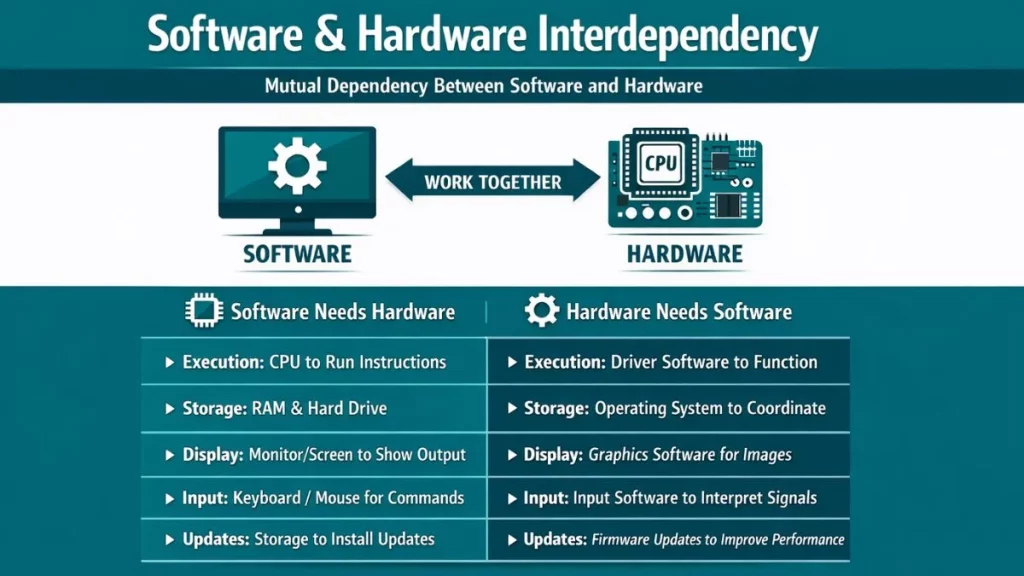
Software and hardware have a mutual dependency. Each is useless without the other. This relationship is called interdependency because both must exist and work together for any computer function.
| Aspect | Software Dependency on Hardware | Hardware Dependency on Software |
|---|---|---|
| Execution | Needs CPU to run instructions | Needs driver software to function |
| Storage | Requires RAM and hard drive | Needs operating system to coordinate |
| Display | Needs monitor/screen to show output | Needs graphics software to display images |
| Input | Needs keyboard/mouse to receive commands | Needs input software to interpret signals |
| Updates | Cannot update without storage hardware | Needs firmware updates to improve performance |
What Are Real-World Examples of Software-Hardware Interaction?
Real-world software-hardware interaction spans from simple LED blinking (GPIO pin control) to complex AI inference (NPU tensor operations). Modern devices showcase this partnership through hardware acceleration, computational photography, and real-time ray tracing, where specialized silicon executes software algorithms 100-1000x faster than general-purpose CPUs.
1. Gaming Console Architecture
Hardware Components:
- Custom AMD APU with CPU cores and RDNA GPU architecture
- GDDR6 memory (unified pool, 448 GB/s bandwidth)
- Custom I/O controller with hardware decompression
- SSD with 5500 MB/s read speed
- DualSense controller with haptic motors and adaptive triggers
Software Components:
- PlayStation OS (FreeBSD-based kernel)
- Game engine (Unreal, Unity) using DirectX/Vulkan API
- Game-specific shaders compiled to AMD GCN ISA
- Audio engine with 3D spatial processing
Interaction Process:
- Audio DSP processes 3D sound, outputs via Tempest 3D Audio
- Controller button press generates USB HID report
- Controller driver converts to game input event
- Game engine’s input manager updates player state
- Physics engine calculates collision, movement (CPU)
- Rendering engine builds command buffer with draw calls
- Graphics driver submits commands via PCIe to GPU
- GPU’s command processor distributes work to Compute Units
- Vertex shaders transform 3D coordinates (GPU parallel processing)
- Rasterizer converts triangles to pixels
- Pixel shaders calculate lighting, textures (thousands of threads)
- Ray tracing accelerators compute realistic reflections (dedicated hardware)
- Display controller sends pixels via HDMI 2.1 at 4K 60fps
How Does Software Control Hardware Components?
Software controls hardware by sending electrical signals through the motherboard’s circuits in binary format. These signals tell transistors inside hardware components to switch on or off, creating the actions we see.
Control Flow Steps:
- High-Level Command: User clicks “Increase Volume.”
- Application Layer: Music player software receives a command
- OS Layer: The operating system translates to a system call
- Driver Layer: Audio driver converts to hardware-specific instructions
- Hardware Layer: Sound card increases voltage to speakers
- Physical Output: Speakers vibrate louder (sound increases)
This process completes in milliseconds. From your click to a louder sound takes less time than one heartbeat. The speed hides the complexity underneath.
Binary code forms the foundation of this control. Every instruction converts to 1s and 0s. A “1” represents electrical voltage (usually 3.3 or 5 volts). A “0” represents no voltage (0 volts). Hardware reads these voltage patterns as instructions.
How is the Software-Hardware Relationship Changing?
Modern technology is blurring the lines between software and hardware through AI-optimized chips and cloud computing. Future developments like quantum computing and neuromorphic chips will create entirely new relationships between instructions and physical components.
Emerging Trends:
1. Hardware-Software Co-Design
Apple’s M-series chips are designed specifically for macOS. The hardware and software teams work together during development. This creates better performance than generic hardware-software combinations. The M2 chip knows exactly what macOS needs. macOS knows exactly what the M2 chip provides.
2. Cloud Computing
Software runs on remote servers (someone else’s hardware). Your local device only needs basic hardware for display. Google Docs doesn’t run on your computer. It runs on Google’s servers. Your browser just shows the interface. Heavy processing happens elsewhere.
3. AI-Specific Hardware
Neural Processing Units (NPUs) are built for AI software. Tensor cores in GPUs optimize for machine learning. These specialized hardware components execute AI algorithms faster than general-purpose CPUs. The hardware matches the software’s specific needs.
4. Software-Defined Hardware
FPGAs (Field-Programmable Gate Arrays) can be reconfigured by software. The hardware changes its physical behavior based on software instructions. This represents a fundamental shift. Traditional hardware is fixed. FPGAs are flexible.
FAQs
Which is more important – software or hardware?
Neither is more important. They’re equally essential for a functioning computer system. The best hardware is useless without software. Sophisticated software can’t run without capable hardware. Both must exist in balance.
Can I run any software on any hardware?
No, software has minimum hardware requirements and compatibility restrictions. Check CPU type, RAM amount, storage space, and OS compatibility before installing. Software designed for powerful hardware won’t run on weak hardware. Software designed for specific operating systems won’t run on others.
