
Before touchscreens became common, computer users pointed light pens directly at their monitors to draw and select items. Engineers in the 1950s developed this technology to make computers more interactive. Understanding light pens helps you appreciate how modern styluses and touchscreens evolved.
What is a Light Pen?
A light pen is a photosensitive computer input device shaped like a pen that detects light emitted from a CRT (Cathode Ray Tube) display. When pointed at the screen, it senses the electron beam’s position and allows users to select, draw, or interact directly with displayed content through precise coordinate detection.
The device works as a sensor, not a light source. Many students mistakenly think light pens emit light like laser pointers, but they actually detect light already present on the screen.
Historical Development of Light Pen
Light pen technology developed gradually through academic and military research projects.
1955: MIT Whirlwind Computer
- First functional light pen prototype created
- Used for air defense calculations
- Proved concept of direct screen interaction
- Research-only application
1963: Ivan Sutherland’s Sketchpad System
- Revolutionary computer-aided design program
- Light pen enabled drawing directly on screen
- Introduced concepts still used in CAD today
- Demonstrated graphical user interface potential
1967: SAGE Air Defense System
- Military implementation for tracking aircraft
- Operators used light pens to identify targets
- Real-time interaction with radar data
- System remained classified until 1980s
1970s-1980s: Commercial Adoption Period
- Point-of-sale systems in retail stores
- Medical imaging equipment in hospitals
- CAD workstations for engineering
- Educational computer systems
- Peak market presence and availability
1990s: Technology Decline
- LCD monitors gained market share
- Incompatibility became critical problem
- Manufacturing ceased for consumer market
- Legacy systems remained in specialized fields
2000s: Complete Obsolescence
- Last CRT monitors discontinued
- Light pens removed from computer catalogs
- Museum pieces and collector items
- Technology is studied only for historical interest
Components Of Light Pen
A light pen contains several essential components that work together to detect screen position. Here are the hardware components of a light pen:
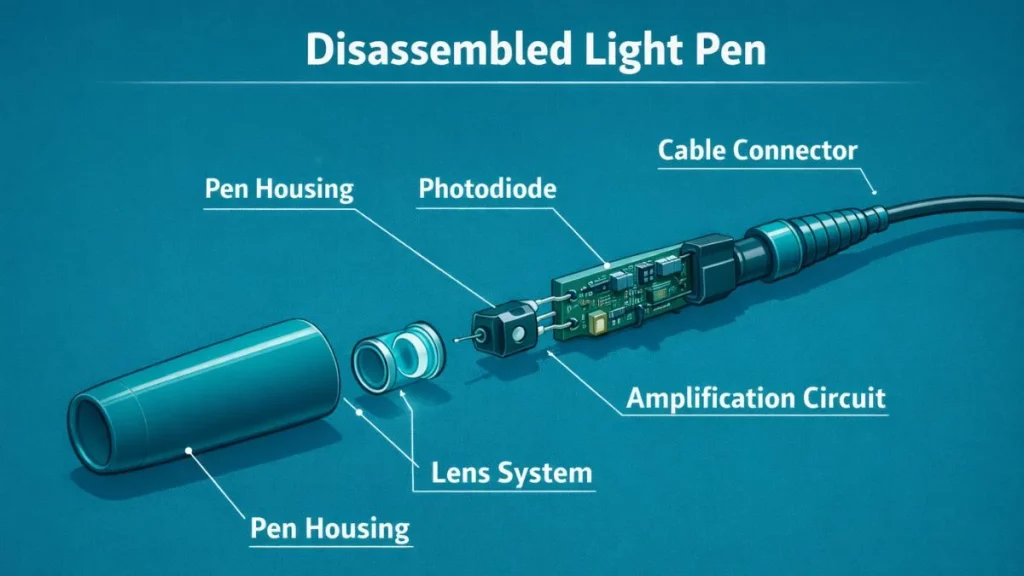
1. Photosensitive Element
The core component is a photodiode or phototransistor that detects light. This sensor responds extremely fast, within 50 to 200 nanoseconds, when light hits its surface. The photodiode operates on the principle of the photoelectric effect, where photons generate an electrical current in a semiconductor material.
2. Lens System
A small lens at the pen’s tip focuses screen light onto the photosensitive element. The lens narrows the field of view to approximately 2-3 millimeters, ensuring the sensor only detects light from the specific screen area where the pen points. This focusing mechanism improves positioning accuracy.
3. Signal Processing Circuit
Electronic circuits amplify the weak electrical signal from the photodiode. Operational amplifiers boost the signal strength while comparator circuits convert the analog signal into digital pulses. These components ensure the computer receives clear, noise-free position data.
4. Connection Interface
Light pens connected to computers through serial ports (RS-232) or parallel ports. Some advanced models used dedicated interface cards. The connection transmitted:
- Position detection signals
- Tip switch status (whether the pen touched the screen)
- Timing synchronization data
5. Physical Housing
The pen’s body provided an ergonomic grip and protected internal electronics. Most light pens included a tip switch and a pressure sensor that activated when the pen touched the screen. This switch distinguished between pointing at the screen and actually selecting or drawing.
Read our detailed guide on Types of Light Pen in Computer to understand its different types.
How Light Pen Works – Step-by-Step Process
Understanding the detection mechanism requires following the process from screen illumination to coordinate calculation.
Step 1: Raster Scan Recognition
The CRT display creates images through a systematic scanning process. The electron beam starts at the top-left corner of the screen. It moves horizontally across each line, illuminating pixels sequentially. When it reaches the right edge, it jumps back to start the next line.
This process repeats continuously:
- Screen refreshes 60-75 times per second
- Each refresh cycle takes 13-16 milliseconds
- Beam travels at a constant, predictable speed
- Creates visible image through persistence of vision
- Phosphor coating glows briefly when struck by electrons
Step 2: Photocell Activation
The user positions the light pen tip directly on the screen surface. The photodiode inside remains inactive until the electron beam passes underneath. When the beam illuminates the phosphor behind that exact screen position, the photodiode detects the brightness spike.
The detection process happens rapidly:
- Photodiode converts light into electrical current
- Current flows only during beam passage
- Signal lasts approximately 0.1-0.3 milliseconds
- Voltage spike reaches 0.5-2 volts
- Electronic circuit amplifies this weak signal
Step 3: Timing Calculation
The computer tracks the electron beam position using internal counters. When the light pen sends its detection signal, the computer reads these counters immediately.
Horizontal counter tracks:
- Pixel position along current scan line
- Resets to zero at start of each line
- Increments with pixel clock (25-40 MHz)
- Provides X-coordinate information
Vertical counter monitors:
- Current scan line number from top
- Resets at start of each frame
- Increments at end of each horizontal line
- Provides Y-coordinate information
Step 4: Coordinate Conversion
The computer converts timing data into screen coordinates using mathematical formulas. The system knows the screen resolution (for example, 640 × 480 pixels). It calculates the exact position where the light pen detected the beam.
Conversion formula:
- X position = (Horizontal count ÷ Pixels per line) × Screen width
- Y position = (Vertical count ÷ Total lines) × Screen height
- Calibration offset adjusts for parallax error
- Result maps to specific pixel address
Step 5: Software Interpretation
The device driver software receives the coordinate data and translates it into meaningful computer input. The operating system treats this information like mouse movement or button clicks.
Application software responds by:
- Recording coordinate sequences for line drawing
- Moving the cursor to detected position
- Executing drawing commands
- Selecting menu items
- Triggering button clicks
Light Pen vs Modern Stylus vs Touchscreen
Understanding these differences clarifies why certain technologies succeeded while others became obsolete.
| Feature | Light Pen (CRT Era) | Modern Stylus (2026) | Touchscreen |
|---|---|---|---|
| Core Technology | Photodiode detection | Capacitive/EMR | Capacitive layer |
| Display Required | CRT only | Any display type | Touch-enabled screen |
| Precision Level | ±1-2 pixels | 0.1mm sub-pixel | Low (finger), High (stylus) |
| Pressure Detection | None (binary on/off) | 4096-8192 levels | Limited in capacitive |
| Response Latency | 16-20 milliseconds | 1-9 milliseconds | 10-50 milliseconds |
| Historical Cost | $200-500 (1980s) | $50-150 today | Built into device |
| Power Source | Computer port | Built-in battery | Display integrated |
| Hand Position | Vertical to screen | Natural writing angle | Direct touch |
| Primary Uses | CAD, medical imaging | Digital art, notes | Mobile devices |
| Current Status | Obsolete (since 1990s) | Current standard | Current standard |
Advantages of Light Pen Technology
Here are benefits of light pen:
- Users pointed directly at screen elements for selection
- Natural hand-eye coordination made interface intuitive
- One-to-one correspondence between pen position and cursor
- Users watched pen tip while marks appeared on screen
- Direct correlation between hand position and visual output
- Natural drawing and writing experience
- Enhanced user experience through real-time response
Disadvantages of Light Pen
Here are some drawbacks of light pen:
- Holding pen against vertical screen caused arm fatigue
- Discomfort after 15-20 minutes of continuous use
- Muscle strain from keeping arms raised
- Particularly problematic for CAD and graphics work requiring sustained use
- Only detected tip switch press or release (binary input)
- Could not vary line thickness based on drawing pressure
Also Read, Uses of Light Pen in Computers to understand its real-life uses
The Teacher’s Perspective: Classroom Experience
I have taught computer science for 15 years and maintain a working Commodore 64 system with its original light pen in our computer history lab. This hands-on equipment helps students understand concepts that seem abstract in textbooks.
Common Student Mistakes I Observe
Misconception 1: “Light pens emit light like laser pointers”
Most students initially believe the pen projects light onto the screen. This confusion makes sense because we call it a “light pen” and lasers are a familiar technology. I demonstrate the truth using a simple experiment.
In a darkened classroom, I shine a flashlight at the light pen’s tip. Students observe the photodiode’s response on an oscilloscope. The device generates electrical signals when receiving light, proving it functions as a detector.
This comparison works effectively:
- Your eye detects light; it doesn’t project light outward
- Light pens work the same way as your retina
- They sense existing light from the screen
- No battery or light source exists inside
Misconception 2: “Light pens work on modern LCD/LED screens”
Students often bring iPads or laptops to class, asking why we cannot use the light pen with them. This question leads to an excellent teaching moment about technology dependencies.
I let students attempt to use the light pen on an LCD monitor. Nothing happens. The pen remains completely unresponsive. This memorable failure demonstration proves the concept better than any lecture.
The explanation becomes clear through comparison:
- CRT displays use a scanning beam that moves continuously
- LCD pixels all illuminate simultaneously
- Light pen needs to “catch” the moving beam
- No scanning pattern means no timing reference
- Technology constraint, not device malfunction
Light Pen Technology in 2026 – Modern Relevance
AI Integration in Modern Stylus Technology
Current stylus devices incorporate artificial intelligence to enhance user experience beyond what light pens could achieve.
Neural Processing Units in Styluses:
Modern high-end styluses contain dedicated AI chips that process input data locally without sending information to cloud servers.
On-device capabilities include:
- Handwriting recognition converts writing to text instantly
- Predictive stroke smoothing reduces jitter in drawn lines
- Context-aware input interprets gestures based on application
- Palm rejection distinguishes intentional input from resting hand
- Battery optimization learns usage patterns to extend charge
