
I remember the exact afternoon I first used a digital camera. It was a Canon PowerShot, nothing impressive by today’s standards. I pressed the shutter button, and within two seconds, the image appeared on the small LCD screen on the back. No waiting. No film roll. No guessing.
That single experience of instant digital feedback is still the core reason millions of students, creators, and professionals choose digital cameras in 2026.
What Is a Digital Camera?
A digital camera is an electronic device that captures photographs and videos by converting light into digital data. That data is then stored as a file on a memory card or internal storage in digital formats such as JPEG or RAW.
A digital camera performs two main jobs:
- It captures light from a scene using a lens and a sensor.
- It converts that light into electronic data and saves it as an image file.
In simple terms, a digital camera is a computer with a lens. The lens collects light. The sensor records it. The processor converts it into a photo you can view, share, or print instantly.
How Did the Digital Camera Develop Over Time?
Understanding where digital cameras came from helps you understand why they work the way they do today. Here is the history of digital camera:
- 1969 — Willard S. Boyle and George E. Smith invented the Charge-Coupled Device (CCD) at Bell Labs. The first semiconductor image sensor was the CCD, invented at Bell Labs in 1969, based on MOS capacitor technology. This invention made digital image capture possible.
- 1975 — Steven Sasson, an engineer at Eastman Kodak, built the first self-contained electronic camera using a CCD image sensor. A first commercial digital camera. The Cromemco Cyclops in 1975 used a 32×32 MOS image sensor.
- 1981 — Sony demonstrated the first filmless SLR camera, called the Mavica, at a public event.
- 1993 — Scientists at NASA’s Jet Propulsion Laboratory improved the CMOS active-pixel sensor. This technology would later become the standard sensor used in almost every camera and smartphone today.
- 2000s — Digital cameras became widely affordable. Megapixel counts increased rapidly. Brands like Canon, Nikon, and Sony competed to produce better sensors.
- 2010s–present — Mirrorless cameras replaced DSLRs as the dominant camera type. Smartphones introduced computational photography. AI-powered features arrived in cameras.
My teacher once told me, “Every technology you use today was someone’s experiment 40 years ago.” Digital cameras are a perfect example. What started as a fuzzy 32-pixel image in 1975 is now a 100-megapixel photograph that prints larger than a wall.
How Does a Digital Camera Work?
A digital camera is not magic, it is a system where optics, electronics, and software work together. Let us go through each stage. Here are step-by-step-step working process of a digital camera:
Step 1 – Light Enters Through the Lens
The lens is the glass element at the front of the camera. Its job is to focus light from the scene onto the image sensor inside the camera.
A lens works using the principles of optics. Light travels in straight lines. When it passes through curved glass, it bends and converges onto a single point that is the sensor. This is the same basic principle that makes magnifying glasses work.
Step 2 – The Shutter Opens
The shutter sits between the lens and the sensor. When you press the shutter button, the shutter opens for a precise amount of time that is called the shutter speed. Common values are 1/60 second, 1/500 second, or 1/2000 second.
- A fast shutter speed (1/1000s) freezes motion — useful for sports photography
- A slow shutter speed (1/30s) captures motion blur — useful for waterfalls or light trails
Step 3 – The Image Sensor Captures Light
This is the most technically important step. The image sensor is a flat chip covered with millions of tiny light-sensitive areas called pixels (short for “picture elements”).
Each pixel is an individual photosite, often called a well. When photons enter the photosite, they hit a light-sensitive semiconductor diode (a photodiode) and are converted into an electrical current that directly corresponds to the intensity of the light detected.
Think of the sensor as a grid of millions of tiny solar cells. Each cell measures how much light hits it and produces an electrical charge in proportion to that light.
Step 4 – Analog-to-Digital Conversion (ADC)
The electrical charges from the sensor are analog signals, which vary continuously. A computer cannot work with analog signals directly. So the camera uses an analog-to-digital converter (ADC) to turn each pixel’s electrical signal into a binary number.
This signal is amplified on-pixel, then sent to an analog-to-digital converter (ADC), which converts it into digital format and sends it to an image processor.
Step 5 – The Image Processor Builds the Image
The raw data from the sensor is not yet a viewable photograph. The image processor (Canon calls theirs DIGIC, Nikon uses EXPEED, Sony uses BIONZ) applies a series of corrections:
- White balance adjustment (corrects color temperature)
- Noise reduction (removes grain from high-ISO images)
- Sharpening (increases edge definition)
- Compression (reduces file size for JPEG output)
Canon’s EOS series has developed proprietary key components, including CMOS image sensors, the DIGIC image processors, and interchangeable lenses, all working together to produce the final image.
Step 6 – The File Is Saved to Storage
The processed image is written to a memory card (SD card, CFexpress, or XQD card) or internal storage. The file format determines how the data is stored:
- JPEG — compressed, immediately viewable, smaller file size
- RAW — unprocessed sensor data, maximum editing flexibility, larger file size
- HEIF — newer format, high quality at smaller file sizes (common on modern Sony and Apple devices)
Components of a Digital Camera
The following are core components of a digital camera:
- Lens — Collects and focuses light onto the sensor. Available as fixed (prime) lenses or adjustable (zoom) lenses.
- Aperture blades — Thin metal blades inside the lens that open and close to control how much light enters.
- Shutter — Opens and closes to control exposure time. Can be mechanical, electronic, or both.
- Image sensor (CMOS/CCD) — Converts light into electrical signals. The most critical component for image quality.
- Image processor — Interprets sensor data and produces the final image file.
- Memory card slot — Accepts SD, CFexpress, or XQD cards for image storage.
- LCD screen — The screen on the back of the camera is used for composing shots and reviewing photos.
- Viewfinder — The small window or electronic display you look through to frame your shot. Optical viewfinders (OVF) show the actual scene. Electronic viewfinders (EVF) show a digital preview.
- Mode dial — Lets you switch between shooting modes: Auto, Aperture Priority (Av), Shutter Priority (Tv), Manual (M), and scene presets.
- Battery — Powers all camera functions. Measured in shots per charge (CIPA standard).
- Hot shoe — A metal bracket on top of the camera that connects an external flash or other accessories.
- Image stabilization — A system that compensates for camera shake. It can be built into the lens (OIS) or the camera body (IBIS — in-body image stabilization).
What Are the Different Types of Digital Cameras?
Here are some different types of digital cameras:
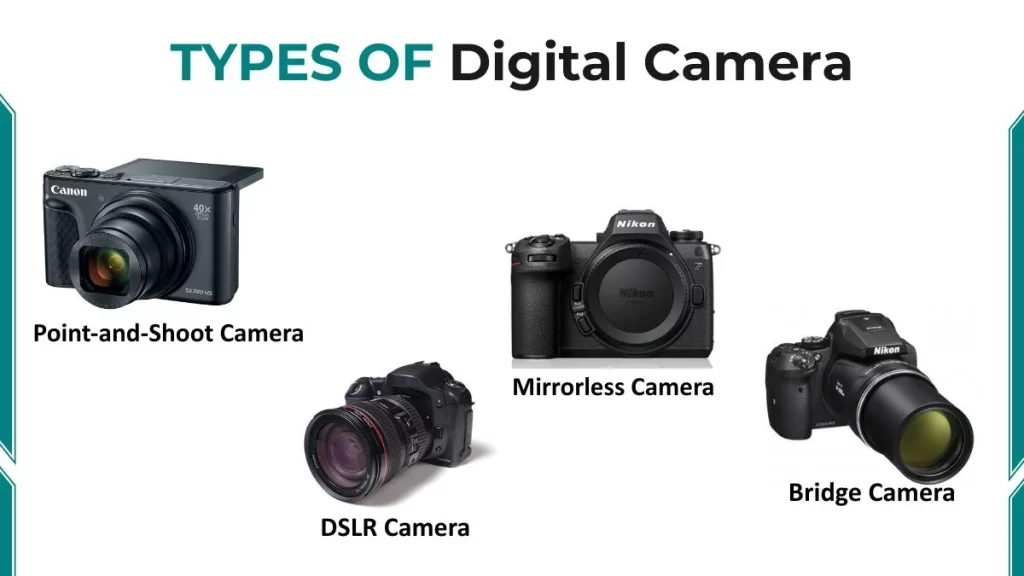
1. Point-and-Shoot (Compact) Cameras
Point-and-shoot cameras are small, automatic, and easy to use. They have a fixed lens (you cannot swap lenses), automatic exposure settings, and fit in a pocket.
Examples: Canon PowerShot V1 (2025), Sony Cyber-shot, Ricoh GR IIIx
2. DSLR (Digital Single-Lens Reflex) Cameras
A DSLR uses a mirror mechanism inside the camera body. When you look through the viewfinder, you see the actual image through the lens. The mirror reflects it into a prism and into your eye. When you press the shutter, the mirror flips up, exposing the sensor.
Examples: Canon EOS Rebel T8i, Nikon D3500, Canon 90D
3. Mirrorless Cameras
Mirrorless cameras remove the mirror mechanism entirely. They use an electronic viewfinder (EVF), a small screen inside the viewfinder that shows a live digital preview of what the sensor sees.
The increasing adoption of mirrorless cameras, improvements in sensor performance, and the popularity of vlogging and commercial imaging applications continue to support long-term market growth.
Examples: Sony A7 IV, Canon EOS R8, Fujifilm X-T5, Nikon Z50 II
4. Bridge Cameras
A bridge camera sits between a point-and-shoot and a DSLR. It has a fixed superzoom lens, often 40x to 100x optical zoom and manual controls similar to a DSLR.
Examples: Sony RX10 IV, Nikon Coolpix P1000 (with 125x optical zoom)
What Is the Future of Digital Cameras?
The digital camera industry in 2026 is evolving rapidly. Here are the most important trends:
- AI-Powered Autofocus – Modern cameras track subjects using artificial intelligence. They detect eyes, faces, animals, and vehicles in real time, even in challenging lighting. Automatic AI-assisted scene recognition is one of the most prominent camera trends, with cameras now adjusting settings like exposure and white balance in real time.
- 8K Video – Multiple cameras now support 8K video recording. In 2025, cameras like the Fujifilm GFX 100 II captured 8K video at 30fps.
- Improved Connectivity – Cameras are increasingly connecting to smartphones via Bluetooth and Wi-Fi for instant file transfer and remote control. This gap between cameras and smartphones in terms of seamless connectivity remains one of the industry’s biggest challenges in 2026.
FAQs
What is a digital camera in simple terms?
A digital camera is an electronic device that captures photographs and videos by converting light into digital files stored on a memory card.
What is the difference between a digital camera and a film camera?
A film camera stores images chemically on a silver-halide film strip that must be chemically developed. A digital camera stores images as binary data files, instantly and at no ongoing cost.
What does megapixels mean?
One megapixel equals one million pixels. It measures how much detail a camera can capture. More megapixels allow for larger prints and heavier cropping, but sensor size matters more for overall image quality.
