
An HDD stores data by magnetizing tiny regions on spinning magnetic platters. Each magnetized spot represents either a ‘1’ or ‘0’ in binary code. A read/write head hovering nanometers above the surface writes data by changing magnetic orientations and reads it by detecting these magnetic fields.
A Hard Disk Drive (HDD) is a type of non-volatile storage device that has been the backbone of computer data storage for decades.
Physical Components of HDD
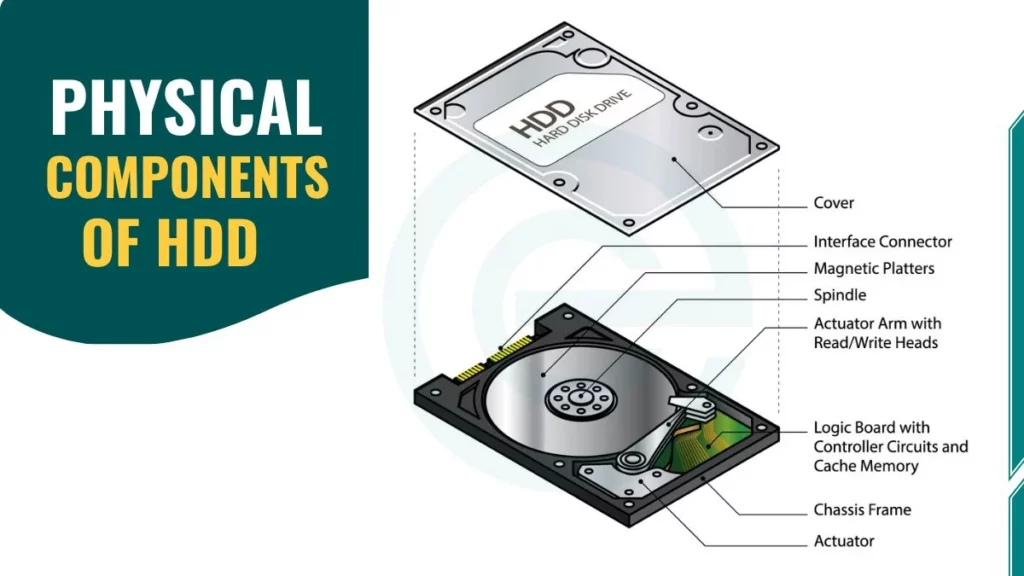
Understanding how hard drives work requires familiarity with their main physical components. Let’s break down each critical element:
1. Platters
Platters are circular disks made of rigid materials that serve as the primary storage medium:
- Materials: Glass or aluminum substrate
- Magnetic coating thickness: 10-20 nanometers (thinner than a virus)
- Diameter sizes: 2.5 inches (laptops) or 3.5 inches (desktops)
- Configuration: Multiple platters stacked vertically to increase capacity
- Surface area: Both top and bottom surfaces are used for storage
Modern HDDs often contain multiple platters stacked on top of each other, multiplying storage capacity without increasing the drive’s physical footprint.
2. Spindle Motor
The spindle is a precision motor that rotates the platters at incredibly high speeds:
- Consumer HDD speeds: 5,400 RPM or 7,200 RPM
- Performance drives: 10,000 RPM to 15,000 RPM
- Function: Maintains constant rotation for consistent data access
- Noise factor: Higher RPM = faster access but more noise and heat
This constant spinning allows the read/write head to access any part of the disk quickly, though it also contributes to the drive’s latency and power consumption.
3. Actuator Arm
The actuator arm is a mechanical arm that moves the read/write head across the platter’s surface with remarkable precision:
- Positioning accuracy: Within nanometers of the target location
- Motor type: Voice coil motor (similar to speaker technology)
- Movement speed: Can traverse the entire platter in milliseconds
- Seek time: Average of 8-12 milliseconds for consumer drives
4. Read/Write Head
The read/write head is perhaps the most critical component. It’s a tiny electromagnetic device that performs the actual data storage and retrieval:
- Flying height: 3-5 nanometers above the platter surface
- Comparison: This gap is 10,000 times smaller than a human hair
- Technology: Uses electromagnetic induction for both reading and writing
- Head crash risk: If the head touches the platter, it causes catastrophic damage
5. Controller Chip
The controller chip acts as the brain of the HDD. It managing all operations:
- Functions: Coordinates actuator movement, manages data flow, handles error correction
- Cache memory: Contains built-in RAM (8MB to 256MB) for faster access
- Interface management: Communicates with your computer via SATA or other protocols
This controller chip translates high-level commands from your operating system into precise mechanical movements.
How Hard Disk Drive (HDD) Store Data?
Let’s follow the journey of how a computer saves data to a hard drive in detail:
Step 1: Receiving the Command
The process begins when you click “Save” on a document:
- Your computer’s operating system converts your file into binary data
- This becomes a long string of 1s and 0s
- The digital signal travels through your motherboard to the HDD’s controller chip
- The controller determines the optimal location for storage
Step 2: Positioning the Head
The actuator arm swings into action with impressive speed:
- The controller calculates the exact track and sector location
- Seek time begins as the arm moves to the target position
- Servo information embedded on the disk guides precise positioning
- The entire positioning process takes 8-12 milliseconds on average
Step 3: Magnetizing the Surface
This is where the actual storage occurs:
- The read/write head contains a tiny electromagnet
- It generates a focused magnetic field that penetrates the coating
- As the platter spins at thousands of RPM, the head pulses its magnetic field
- Each pulse changes the polarity of a microscopic region on the magnetic coating
- The process happens at incredible speed—millions of bits per second
Step 4: Creating Binary Bits
Each magnetized region represents one bit of information:
- North-South orientation: Represents binary ‘1’
- South-North orientation: Represents binary ‘0’
- Bit density: Modern drives store over 1 trillion bits per square inch
- Pattern organization: Bits are arranged in organized patterns across tracks
The HDD writes millions of these bits in organized patterns across the platter’s surface. It creates a permanent magnetic “map” of your data.
