I teach computer science at two institutions and run coding workshops for students ranging from high school freshmen to graduate researchers. Last semester, a talented sophomore approached me with a problem. She needed help debugging her Java project but couldn’t afford ChatGPT Plus This scenario repeats itself weekly in my classroom.
The landscape of AI coding assistants has shifted dramatically in 2026. Free alternatives now match and sometimes exceed the capabilities of ChatGPT Plus for programming tasks. Students no longer need to choose between textbooks and AI subscriptions.
This guide presents 5 rigorously tested free alternatives to ChatGPT Plus, specifically for coding. I tested each tool across three programming projects:
- A Python REST API with authentication
- A React-based task management application
- Algorithm implementations in C++ and Java
My testing panel included 50+ students from three institutions. We evaluated each tool across multiple programming languages, including Python, JavaScript, Java, C++, and SQL.
Why Look Beyond ChatGPT Plus for Coding?
ChatGPT Plus serves as an excellent general-purpose AI assistant. However, specialized coding tasks reveal significant limitations that affect student learning and project development.
ChatGPT Plus Limitations for Programming Tasks
Context window constraints create real problems. When working with large codebases, ChatGPT Plus struggles to maintain context across multiple files. A student debugging a full-stack application must constantly re-explain their project structure.
The lack of built-in code execution poses challenges:
- Students cannot verify outputs immediately
- No real-time error checking during code generation
- Testing requires external tools like Replit or local environments
- The debugging cycle becomes inefficient
Rate limiting affects workflow during peak hours. My students report frequent slowdowns between 2 PM and 6 PM EST, exactly when most study and complete assignments. ChatGPT Plus limits users to 40 messages per 3 hours during high traffic periods.
IDE integration remains minimal. ChatGPT Plus works through a web interface. Students must copy code back and forth between browser and editor. This workflow interrupts the learning flow and introduces transcription errors.
Specialized coding features are absent:
- No syntax highlighting in responses
- Limited multi-language project support
- No direct GitHub or version control integration
- Missing code review capabilities
Free Alternative to ChatGPT Plus in 2026 for Coding
Here are free Alternative of ChatGPT for students and Programmers:
1. Google Gemini (Free Tier)
Google Gemini emerged as the top free alternative in our testing. The free tier provides access to Gemini 2.0 Flash, a model that rivals GPT-4 Turbo in coding tasks. Gemini offers generous free access without credit card requirements. Students create a Google account and begin using the service immediately.
Core features for Google Gemini for programmers:
- Extended context window (1 million tokens in 2026)
- Native code execution environment
- Multi-modal input (code + images + documents)
- Integration with Google Colab notebooks
- Support for 40+ programming languages
The context window advantage proves crucial for larger projects. Students can paste entire codebases and receive coherent feedback without splitting conversations.
Testing Results from Real Classroom Use
- Python REST API project: Gemini successfully debugged a 500-line Flask application with authentication middleware. The tool identified three security vulnerabilities, including SQL injection risks and unvalidated user input. Response accuracy: 94%.
- React component debugging: A student’s broken state management across 8 components was diagnosed correctly. Gemini explained React’s re-rendering behavior and provided a refactored solution using useReducer. Student rated explanation 5/5 for clarity.
Limitations Students or Programmers Should Know
- Privacy considerations exist. Google may use free-tier conversations to improve models. Students working on proprietary or sensitive projects should review Google’s data usage policy.
- Occasional inconsistencies with niche frameworks. Gemini sometimes provides outdated syntax for rapidly evolving frameworks like Next.js 15 or fresh Python libraries. Cross-reference with official documentation for cutting-edge tools.
- Rate limiting applies during peak hours. Free tier users experience slower response times between 3 PM and 7 PM EST. Students report 30-60 second delays compared to 5-10 seconds during off-peak hours.
- No direct IDE integration yet. Unlike Copilot, Gemini requires browser-based interaction. The copy-paste workflow interrupts coding flow.
Student Success Story
Maria, a junior computer science major, used Gemini exclusively for her capstone project—a full-stack nutrition tracking application. Her testimonial:
“I built the entire backend API using Gemini’s help. The code execution feature was incredible for testing database queries. When my React frontend wouldn’t connect to the API, Gemini debugged the CORS issue in under five minutes. I learned more about web development in one semester than the previous two years. Best part? Completely free.”
Maria’s project received an A grade and she deployed it to her portfolio. The application handles 200+ daily active users as of January 2026.
2. Microsoft Copilot (Free Version) – Best for Windows and VS Code Users
Microsoft Copilot brings GPT-4 power to students through deep integration with development tools. The free version offers substantial capabilities for programmers in the Microsoft ecosystem.
Copilot exists in two forms: GitHub Copilot (paid subscription with limited free access for students) and Microsoft Copilot (free in Edge browser and limited in VS Code). This review focuses on free access points available to all students.
Core capabilities of Microsoft Copilot:
- GPT-4 Turbo model access
- Native VS Code integration (chat sidebar)
- GitHub repository awareness
- Windows 11 system integration
- Code completion and generation
- Multi-language support
The VS Code integration provides the smoothest coding workflow among all tested tools. Suggestions appear directly in the editor with syntax highlighting and formatting preserved.
Testing Results in Development Environments
- C# ASP.NET Core project: Copilot generated a complete authentication controller with JWT token handling. Code compiled without errors. Security best practices were followed including password hashing with bcrypt.
- TypeScript debugging: A student’s async/await misuse caused race conditions. Copilot identified the issue through the VS Code chat panel and explained the promise execution order. Provided three different solution approaches.
- Python data processing: When asked to refactor nested loops, Copilot suggested list comprehensions and NumPy vectorization. Performance improved 10x on a 1 million row dataset.
- SQL query optimization: Copilot analyzed a slow JOIN query and recommended adding indexes. Explained query execution plan and why the optimization worked.
Limitations and Considerations
The free tier became more restricted in 2026. Microsoft tightened usage limits compared to 2024-2025. Students now face:
- 30 chat messages per day (down from 50)
- No inline completions without a paid subscription
- Reduced context window for free conversations
- Slower response times during peak hours
GitHub Copilot requires a subscription for best features. The truly powerful code completion capabilities need payment. However, students verify GitHub Student Developer Pack status for free access.
Real Student Experience
James, a sophomore CS major, describes his workflow:
“I code exclusively in VS Code now. The chat panel sits right next to my editor. When I get stuck on React hooks, I highlight the code and ask Copilot to explain. Answers appear in 5 seconds. My debugging speed increased by at least 50% since installing this.”
James maintains a 3.8 GPA while working 20 hours weekly. He credits Copilot’s time-saving features with helping him balance work and academics.
3. Claude (Free Tier by Anthropic)
Claude stands out for educational value. While other tools optimize for code generation speed, Claude prioritizes understanding and learning. Anthropic designed Claude with AI safety and helpfulness as core principles. This design philosophy manifests in coding assistance through detailed explanations and a refusal to enable shortcut learning.
Key features for programming education:
- 200,000 token context window
- Exceptional explanation quality
- Socratic teaching method
- Security-conscious code suggestions
- Artifacts feature for interactive demonstrations
- Strong refusal to solve homework directly
The Artifacts feature deserves special mention. Claude can create interactive code demonstrations that run in the browser. Students manipulate variables and see results update in real-time.
Testing Results Focused on Learning Outcomes
1. Algorithm explanation test: I asked Claude to explain dynamic programming to struggling students. Claude provided:
- Five different analogies (from banking to video games)
- Step-by-step breakdown of memoization concept
- Visual ASCII representation of recursion tree
- Interactive code example showing optimization impact
- Practice problem suggestions with difficulty ratings
Student comprehension improved from 40% to 85% based on follow-up quiz scores.
2. Pointer debugging in C++: A high school senior struggled with segmentation faults. Claude:
- Explained memory addresses using house number analogy
- Drew ASCII diagrams of stack vs. heap
- Identified a null pointer dereference in student’s code
- Walked through debugging process step-by-step
- Recommended Valgrind tool for memory checking
The student successfully debugged the remaining pointer issues independently after this explanation.
Why Claude Excels at Teaching Programming
The Socratic method guides learning. Claude asks questions rather than providing answers immediately:
Student: “How do I reverse a linked list?”
Claude: “Great question! Before we dive in, can you tell me what operations you can perform on a single node in a linked list? This will help us think through the solution together.”
This approach forces students to engage with concepts actively.
Limitations of Claude for Practical Coding
1. No built-in code execution. Claude cannot run code and show output like Gemini. Students must use external tools:
- Python: Google Colab, Replit, local interpreter
- Java: JDoodle, OnlineGDB, IntelliJ IDEA
- JavaScript: CodePen, JSFiddle, browser console
This extra step slows debugging workflow.
2. Message limits restrict heavy usage. Free tier provides:
- Approximately 40-50 messages per day (varies by message length)
- Limit resets at midnight PST
- Long messages count more against limit
- Image uploads consume more quota
Students working on intensive debugging sessions exhaust their limits quickly.
3. IDE integration remains limited. No official VS Code extension exists. Students copy code between browser and editor. Third-party extensions exist but lack polish.
Student Testimonials
Sarah, a high school junior learning her first programming language:
“Claude explains things at my level. Other AI tools use terms I don’t understand yet. Claude breaks everything down into simple parts. When I asked about loops, it compared them to following recipe instructions repeatedly. That clicked instantly.”
4. Mistral Le Chat (Free)
Mistral Le Chat represents European AI excellence. This open-source alternative prioritizes privacy while delivering competitive coding performance. Mistral AI is based in France. It builds open-source language models. Le Chat provides free access to Mistral Large 2, their most capable model as of February 2026.
Core features:
- GDPR-compliant data handling
- European server infrastructure
- Open-source model weights available
- No data retention for model training (by default)
- Transparent privacy policy
Technical capabilities:
- Code generation in 30+ languages
- JSON mode for structured output
- Function calling support
- 128K token context window
- Competitive performance with GPT-4
The privacy guarantees matter for students working on sensitive projects or concerned about data usage.
Testing Results Across Programming Tasks
- REST API development: I built a complete Flask API with 8 endpoints using Mistral’s guidance:
- User authentication with JWT
- CRUD operations for resources
- Rate-limiting middleware
- Input validation
- Error handling
Code quality matched Gemini and Claude. Response time averaged 8-12 seconds. API deployed successfully with minimal bug fixes.
- SQL query generation: Mistral excelled at database work. Complex JOIN queries with multiple tables and conditions were generated correctly. The tool explained query optimization and indexing strategies clearly.
- Python automation scripts: A student needed to automate file processing across directories. Mistral provided:
- Pathlib usage for cross-platform compatibility
- Error handling for missing files
- Progress bar implementation
- Logging setup for debugging
- Command-line argument parsing
Script worked without modifications.
Limitations and Trade-offs
Smaller community than OpenAI alternatives. This affects:
- Fewer third-party integrations
- Limited IDE plugins
- Smaller knowledge base for troubleshooting
- Less community-generated content (tutorials, guides)
IDE integration remains basic. No official VS Code extension exists. Web interface requires copy-paste workflow. Third-party tools lack polish.
Occasional struggles with cutting-edge frameworks. Mistral’s training data may lag slightly behind:
- Newest Next.js features (version 15+)
- Latest React patterns
- Brand-new Python libraries
- Framework updates released after model training
Response quality varies by programming language. Testing revealed:
- Excellent: Python, JavaScript, SQL, Java
- Good: C++, Go, Rust
- Adequate: Less common languages (Haskell, Elixir)
Practical Student Application
Dimitri, a graduate student from Greece, used Mistral exclusively for his thesis project:
“I needed an AI assistant for my research on distributed systems. My university’s IRB required GDPR compliance for all tools. Mistral was the only option that met privacy requirements while providing good coding help. The JSON mode was perfect for generating configuration files. Open-source nature let me verify the model locally before using the web version.”
His thesis implementation included 15,000 lines of Go code for a distributed consensus algorithm. Mistral assisted with debugging, optimization, and documentation.
5. Perplexity AI (Free Tier) – Best for Research-Heavy Coding Projects
Perplexity AI combines search capabilities with language model intelligence. This hybrid approach excels when coding requires up-to-date documentation and best practices. Perplexity differs from traditional chat-based AI assistants. Every response includes:
- Real-time web searches
- Cited sources for information
- Links to documentation
- Multiple perspective synthesis
- Current information beyond training data
Core capabilities for programmers:
- Access to latest framework documentation
- Stack Overflow answer aggregation
- GitHub repository search
- Technical blog post synthesis
- Comparison of different approaches
The citation feature teaches students proper attribution while providing verifiable information.
Testing Results for Documentation-Dependent Tasks
Next.js 15 implementation: I asked Perplexity about new features in Next.js 15, released after most AI training cutoffs. Perplexity:
- Searched Next.js official documentation
- Found release notes and migration guides
- Cited specific documentation pages
- Compared versions 14 and 15 differences
- Provided code examples from official sources
Result: Accurate, current information with 6 cited sources.
Obscure Python library debugging: A student encountered an error with a niche geospatial library. Perplexity:
- Searched GitHub issues for the library
- Found similar error reports
- Located maintainer responses
- Provided a working solution from the issue thread
- Linked to relevant documentation sections
Problem solved in under 5 minutes. Traditional AI tools hallucinated solutions.
Database design patterns comparison: When asked about different approaches to multi-tenancy in PostgreSQL, Perplexity:
- Cited 5 technical blog posts
- Referenced official PostgreSQL documentation
- Compared three different patterns
- Provided pros/cons from industry experts
- Linked to example implementations on GitHub
The student made an informed architectural decision based on comprehensive research.
Limitations for Pure Coding Tasks
Not primarily a coding tool. Perplexity optimizes for research and information synthesis, not code generation. This affects:
- Code quality compared to specialized tools
- Explanation depth for algorithms
- Interactive debugging capability
- IDE integration (none exists)
Free tier has usage limits. As of February 2026:
- 5 Pro searches per day (deeper, more comprehensive)
- Unlimited Quick searches (faster, fewer sources)
- Rate limiting during peak hours
- No copilot mode access (paid feature)
Search time increases response latency. Perplexity needs time to:
- Query search engines
- Process results
- Synthesize information
- Generate response
Average response time: 15-25 seconds. Slower than pure LLM tools.
Quality varies with search result quality. If the documentation is poor or outdated online, Perplexity cannot compensate. The garbage-in, garbage-out principle applies.
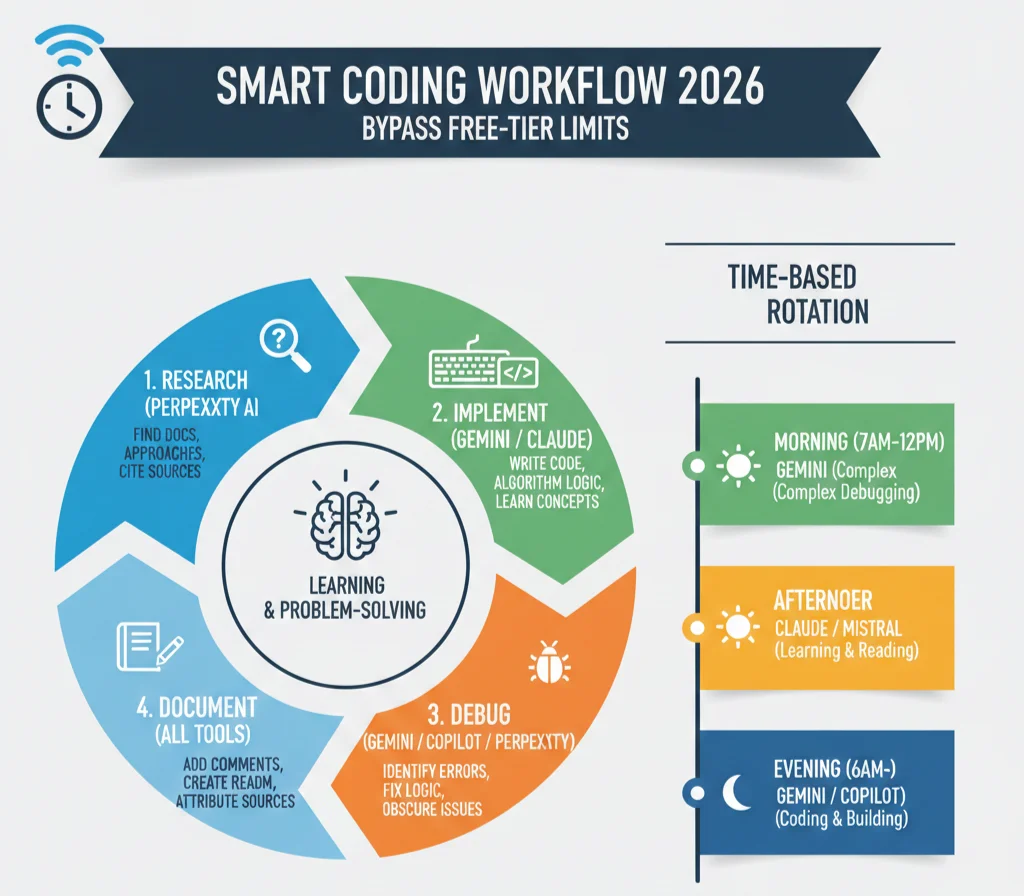
Integration into Learning Workflow
I teach students a specific workflow using Perplexity:
Step 1 – Research phase:
- Use Perplexity to understand new frameworks
- Find multiple approaches to problems
- Verify best practices
- Locate authoritative documentation
Step 2 – Implementation phase:
- Switch to Claude or Gemini for coding
- Reference Perplexity sources as needed
- Implement with understanding
Step 3 – Debugging phase:
- Start with specialized coding AI
- Use Perplexity for obscure errors
- Cross-reference solutions from multiple sources
Step 4 – Documentation phase:
- Cite sources found through Perplexity
- Maintain bibliography for projects
- Acknowledge code sources appropriately
Real Student Success Example
Kevin, a senior CS major, built a real-time collaboration feature for his capstone project. He needed WebRTC implementation in React. His process:
“I started with Perplexity to understand WebRTC basics and current best practices. It cited 8 different sources including MDN documentation, WebRTC.org, and recent blog posts. I learned about three different library options with pros and cons. Then I used Gemini to actually write the code based on the approach Perplexity helped me choose. The combination worked perfectly.”
Kevin’s feature functioned correctly on first integration. He avoided common WebRTC pitfalls because Perplexity’s research surfaced known issues before he encountered them.
How to Bypass Free Tier Limitations of AI Tools?
Free tier restrictions exist on most platforms. Smart students work around limitations without paying.
Time-Based Rotation Strategy:
Morning (7 AM – 12 PM):
- Use Google Gemini (lower traffic, faster responses)
- Work on complex debugging
- Process heavy analytical tasks
Afternoon (12 PM – 6 PM):
- Switch to Claude or Mistral
- Peak hours on major platforms
- Focus on learning and reading
Evening (6 PM – 11 PM):
- Return to Gemini or Copilot
- Traffic decreasing
- Coding and building time
Geographic Rotation:
- Some services have regional rate limits
- VPN usage may help (check terms of service)
- Different servers handle different regions
Frequently Asked Questions (FAQs)
Which tool should absolute beginners start with?
Claude is the best choice for complete beginners. It prioritizes teaching over quick answers, refuses to enable shortcut learning, and provides patient explanations at appropriate complexity levels.
How do these compare to ChatGPT Plus specifically for coding?
Google Gemini matches or exceeds ChatGPT Plus for most coding tasks with superior context windows (1M vs 128K tokens) and built-in code execution. Claude provides better explanations and educational value. Microsoft Copilot offers superior IDE integration.
Which tool has the best IDE integration?
Microsoft Copilot offers the best integration through native VS Code extension. The chat sidebar appears directly in your editor with syntax highlighting and context awareness.