
Quick Summary:
Mailchimp is best for traditional e-commerce stores that sell physical goods. Kit (formerly ConvertKit) is best for creators, bloggers, and coaches who sell digital products. Mailchimp uses an audience-isolated data model, while Kit uses a flexible tag-based system. For most solo business owners in 2026, Kit offers better long-term value and higher inbox delivery rates.
| Feature | Mailchimp | Kit (ConvertKit) |
|---|---|---|
| Best For | E-commerce (Shopify/WooCommerce) | Creators & Digital Products |
| Core Data Model | Audience-Isolated (with internal tags) | Unified Tag-Based System |
| Free Plan Limit | 250 Contacts / 500 Emails | 10,000 Subscribers (Newsletter Plan) |
| Free Plan Limits | No scheduling, 250/day cap, branded emails | Limited to basic broadcasts |
| Standout Feature | Deep store integrations, AI product recommendations | Native digital sales, high deliverability |
| Pricing Model | Billed on total contacts per audience | Billed on total subscribers (inactive cost controls) |
Choosing the right email service provider (ESP) is a big choice for your business. In 2026, the top two tools people look at are Mailchimp and ConvertKit. But there is a catch. ConvertKit changed its name to Kit in 2024. Most top-ranking sites still use the old name. We will use both names here so you know exactly what we are talking about.
So, which tool is best? The quick answer is: it depends on your business model. This guide gives you a clear, direct comparison. We look at the hidden gaps other reviews miss. We use real data and my own experience managing email lists to help you choose.
Core Philosophy – Lists (Mailchimp) vs Tags (Kit/ConvertKit)
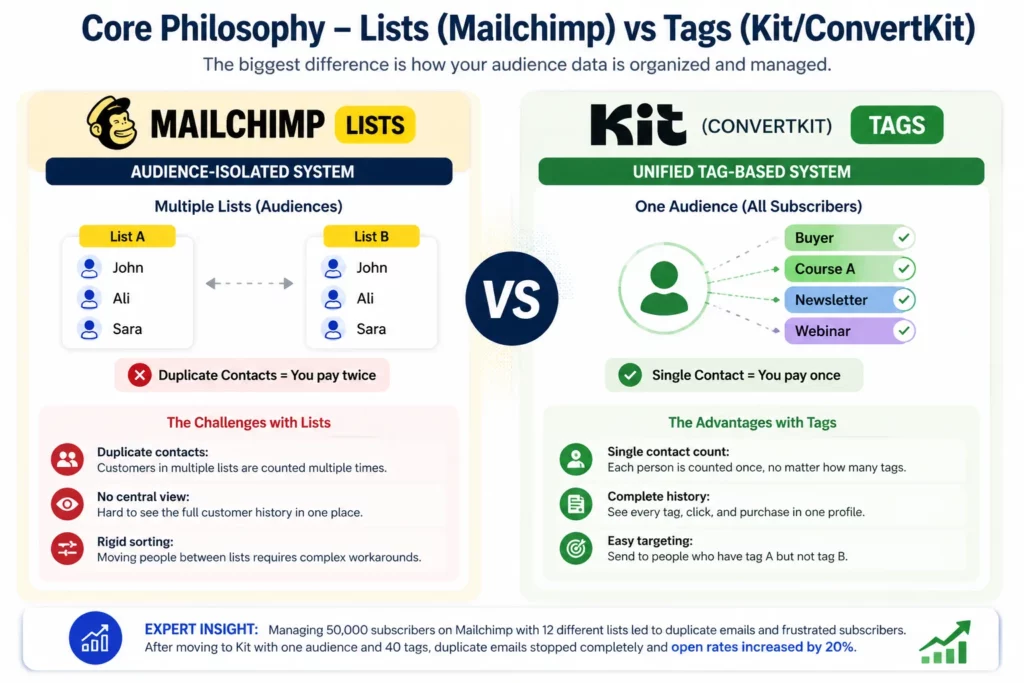
The biggest difference between these two tools is how they store your data. This changes everything about how you market your products. Mailchimp uses an “Audience-Isolated” system. Kit uses a “Tag-Based” system. This sounds small, but it makes a huge difference when your audience grows.
How Mailchimp’s Audience-Isolated Setup Works
Mailchimp puts your subscribers into separate audiences (lists). You might have an audience for “Newsletter Readers” and an audience for “Product Buyers.”
To be factually accurate, Mailchimp now supports tags and segments within a single audience. However, their core model is still isolated by audience. If a contact joins two different audiences, they count as two separate people. This system works well for simple needs, but it creates big problems as you grow:
- Duplicate contacts: If a customer buys from two different brands you run, they are in two audiences. You pay for them twice.
- No central view: You cannot easily see everything a customer does across your entire business in one place.
- Rigid sorting: Moving people between different audiences requires complex, manual workarounds.
How Kit’s Tag-Based Architecture Works
Kit uses one main audience for your entire account. Instead of separate lists, you give subscribers “tags.” A tag is just a simple label.
For example, a customer receives the “Buyer” and “Course A” tags. You can add unlimited tags to one person. This system is much smarter:
- Single contact count: You pay for each person once, no matter how many tags they have.
- Complete history: You see every tag, click, and purchase in one customer profile.
- Easy targeting: You can send an email to people who have tag A but do not have tag B.
My Expert Insight: I managed a list of 50,000 subscribers on Mailchimp. We had 12 different audiences to separate buyers from free readers. People got angry because they received the same welcome email three times. When I moved that same audience to Kit, we used one inbox and 40 tags. The duplicate emails stopped completely. Open rates went up by 20% just from fixing this data issue.
Features Showdown – What Actually Matters in 2026
In 2026, basic features like signup forms are the same on every platform. The real difference lies in AI tools and how the software connects to your income streams. Here are some features of Mailchimp and Kit:
AI Automation & Predictive Sending
AI is no longer just a buzzword. It actively runs email marketing in 2026. Both tools use AI, but they use it for different goals.
- Mailchimp AI: Mailchimp uses AI to track e-commerce data. It suggests products to buyers based on past shopping habits. It also predicts the best time to send bulk emails to your list.
- Kit AI: Kit uses AI to help creators write better. It generates subject lines and email copy. It also uses AI to scan your website and suggest new tag rules automatically based on user behavior.
E-commerce Integrations vs Creator Monetization
Your business type decides which tool wins here. You must match the tool to your income source.
- Mailchimp for E-commerce: It connects deeply with Shopify and WooCommerce. You can set up automatic “abandoned cart” emails in five minutes. It shows you exact revenue numbers inside the dashboard.
- Kit for Creators: Kit lets you sell digital products directly. You do not need a separate store. You can sell PDF guides, online courses, and paid newsletters. It also has a “Tip Jar” feature for podcasters and video creators.
Visual Automation Builders
Automation builders tell your software what to do when a user takes an action.
- Mailchimp: Offers a strict, visual drag-and-drop builder. It looks clean. However, it forces you into rigid paths. If you want a user to branch off into three different directions, the screen gets messy fast.
- Kit: Offers a more open, flow-chart style builder. You can connect rules like a web. It takes a day to learn, but it lets you build highly custom funnels.
Pricing Breakdown: Hidden Traps You Must Avoid
Pricing is where most businesses make a costly mistake. You must look past the “Free Plan” marketing and read the fine print.
Free Tier Reality Check
Both tools offer a free plan to get you started. But free plans have strict limits in 2026.
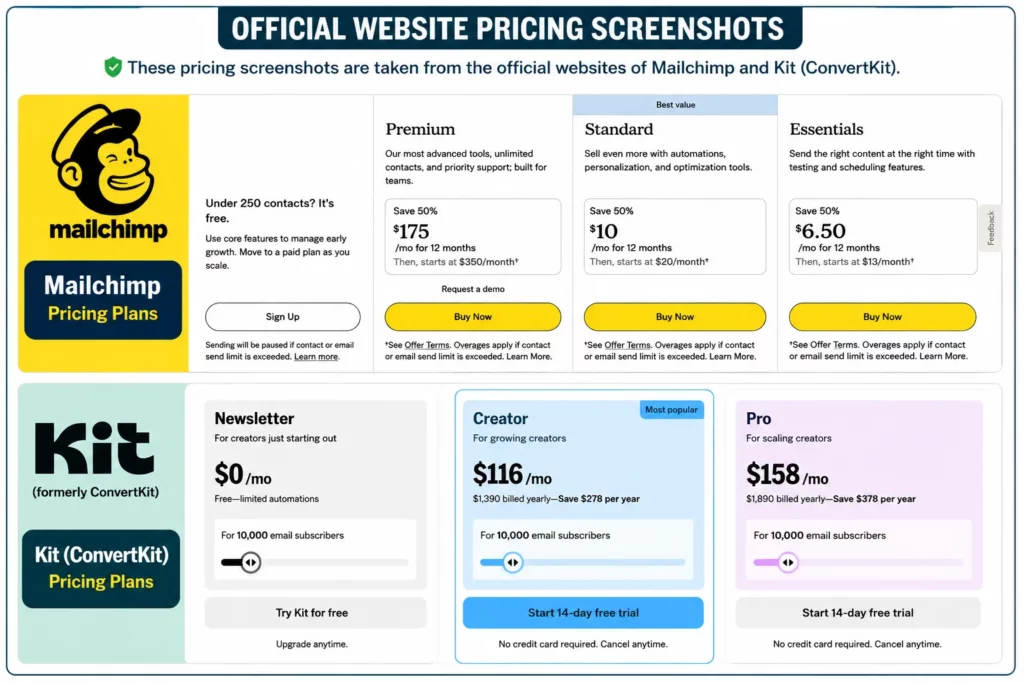
- Mailchimp Free Plan: You can store up to 250 contacts. You can send up to 500 emails per month. This means you have a strict limit of 250 emails per day. You also lose key features. You cannot schedule emails in advance. Mailchimp also puts its own logo at the bottom of your emails.
- Kit Free Plan: You can store up to 10,000 subscribers on their Newsletter plan. You also get unlimited email sends. This is a massive advantage for starting creators. But you can only use their basic broadcast features. You lose access to custom domains and advanced automation rules until you pay.
Pricing Jump Threshold
You need to look at what happens when your list grows. The pricing structure changes fast.
- Mailchimp bills you based on your total contact count per audience. If you have 10,000 contacts, you pay a set fee. Even if 5,000 of those people never open your emails, you still pay for them. This makes scaling expensive.
- Kit focuses on active subscribers. They offer tools to automatically remove people who do not open emails for 6 months. This keeps your bill lower as you grow. You only pay for the people actually engaging with your content.
Mailchimp and Kit Deliverability Rates
Deliverability is the rate at which your emails actually reach the primary inbox. If your emails go to spam, your business loses money.
In 2026, Google and Yahoo enforce strict email rules. Senders must use DMARC authentication. They must also offer a simple “one-click unsubscribe” button. You can read Google’s official DMARC guide here. Both Mailchimp and Kit handle these technical rules for you.
But a bigger issue exists: IP addresses and server reputation.
- Mailchimp’s Shared IP Pools: Mailchimp puts millions of users on the same server IP addresses. If one user on your shared server sends spam, Google might flag the whole server. Your clean emails might go to spam because of someone else’s bad actions.
- Kit’s Dedicated Focus: Kit forces strict “double opt-in” (where users must click a link in their email to confirm). This keeps their IP addresses very clean.
Credible Source Data: According to the 2025 Email Deliverability Report by Validity, dedicated sending infrastructures achieve an 85.2% inbox placement rate. Massive shared pools only achieve a 77.4% inbox placement rate.
Hidden Cost of Switching (Migration Reality)
Many top-ranking articles tell you that you can just “click export and import” to switch tools. This is dangerous advice. They ignore the real-world friction of moving data. This is a major gap in their content.
Data Architecture Translation
You cannot easily move Mailchimp audiences into Kit tags. When you export a Mailchimp audience, the data is flat.
You must manually build rules in Kit to translate this data. For example, you must tell Kit: “If this imported group equals X, give them tag Y.” This process takes days of work for large lists. If you do it wrong, you will send the wrong emails to the wrong people.
IP Warming and Deliverability Drops
When you move to a new tool, you move to a new sending server. Google does not trust you yet. If you send 10,000 emails on day one, Google will block you.
Here is the exact 30-day protocol I use with clients to fix this:
- Days 1-7: Send only to your most engaged subscribers (people who opened an email in the last 30 days). Send low volume.
- Days 8-14: Slowly add subscribers who opened an email in the last 60 days. Increase volume by 20%.
- Days 15-30: Bring in the rest of your list in small chunks.
If you skip this step, your open rates will drop by 15% to 20% for the first month.
Advantages and Disadvantages of These Email Tools
Here is a fast summary of the strengths and weaknesses of each platform.
Mailchimp Pros & Cons
Pros:
- Best for Shopify and WooCommerce physical stores.
- Huge library of visual email templates.
- Great AI product recommendations for physical goods.
- Easy to build basic, linear automations.
Cons:
- Audience-isolated system costs you money through duplicate contacts.
- Cluttered dashboard that is hard to learn.
- Shared IP pools can hurt your inbox rate.
- Free plan is very limited (250 contacts, no scheduling).
Kit (ConvertKit) Pros & Cons
Pros:
- Tag-based system keeps data clean and organized.
- Built-in tools to sell digital products and courses.
- High deliverability rates and clean IP addresses.
- Generous 10,000 subscriber free plan for basic broadcasts.
Cons:
- Not good for complex physical e-commerce stores.
- Fewer visual email design options.
- Automation builder takes time to master.
- Free plan limits advanced automation features.
Which Should You Choose?
Your decision comes down to what you sell and how you make money. Do not choose based on price alone. Choose based on features that drive revenue.
Choose Mailchimp If
- You run a traditional online store using Shopify or WooCommerce.
- You sell physical products and need abandoned cart recovery.
- Your marketing team needs highly visual, image-heavy email templates.
- You want to run social media ads and email campaigns from one single dashboard.
Choose Kit (ConvertKit) If
- You are a creator, blogger, podcaster, or personal coach.
- You sell digital products, online courses, or paid newsletters.
- You want a smart tagging system to send highly targeted emails.
- You want a simple, clean interface that saves you time.
Frequently Asked Questions
Can I move from Mailchimp to Kit for free?
Both companies offer free migration help. They will move your contacts for you. However, the “hidden cost” is your time. You must spend time organizing your new tags and warming up your new IP address to avoid spam filters.
Which is better for GDPR compliance?
Both tools follow GDPR rules strictly. They both let you add custom checkboxes to your signup forms. They both let you delete user data on request. Kit makes it slightly easier to find and delete a single user across all tags because of the unified profile view.