
Advantages of email include fast delivery, zero cost, global reach, easy file sharing, and a permanent written record of all communication. Its main disadvantages include spam, phishing risks, information overload, tone misinterpretation, and complete dependency on internet access. Overall, email is one of the most useful tools for students and professionals, but it works best when you understand both its strengths and its limitations.
Before we dive in, if you are new to this topic, read our detailed guide on what is email and how it works first.
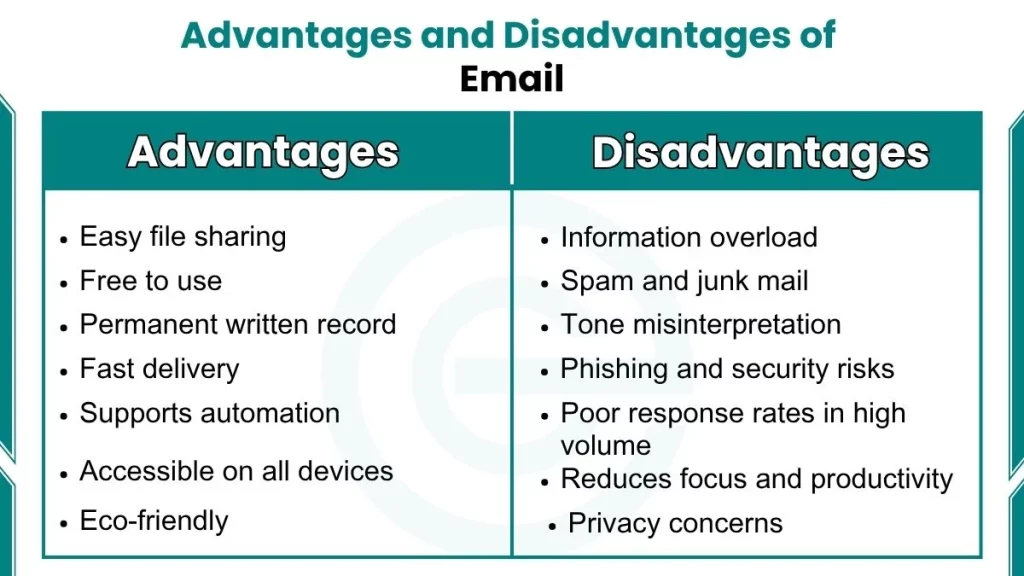
Advantages of Email
Here are some benefits of Email:
1. Email Is Free to Use
One of the biggest advantages of email is the cost. You do not pay to send or receive a message. Platforms like Gmail, Outlook, and Yahoo Mail offer free accounts with large storage spaces. Compare this to postal mail, where you pay for paper, envelopes, and postage stamps. Businesses also save on printing costs, paper, and courier services by switching to email communication.
2. Email Delivers Messages Almost Instantly
Email is fast. Once you click “Send,” the message reaches the recipient in seconds, regardless of where they are in the world. This is a significant improvement over traditional postal mail, which takes days or even weeks to arrive.
Email uses the SMTP (Simple Mail Transfer Protocol) to transfer messages between servers. This protocol ensures that your email reaches the correct address almost immediately.
3. Email Gives You Global Reach
Email works across countries, time zones, and languages. You can send a message to someone in Japan, Canada, or South Africa without any additional cost or complexity. This makes email a truly global communication tool.
It also works asynchronously. This means the sender and receiver do not need to be online at the same time. You send the message, and the other person reads it when they are available. This is especially useful when communicating across different time zones in professional settings.
4. Email Supports File Attachments and Media Sharing
Email allows you to send much more than just text. You can attach:
- Documents and PDFs
- Spreadsheets and presentations
- Images and videos
- Compressed files (ZIP format)
For students, this means you can submit a full project including a report, a presentation, and supporting images, all in one email. Platforms like Gmail also integrate with Google Drive, and Outlook integrates with OneDrive, allowing you to share large files that exceed standard attachment size limits.
5. Email Creates a Permanent Written Record
Every email you send or receive is automatically saved with a date, time, and the sender’s name. This creates a documented record of all communication. You can search your inbox years later and find an exact conversation.
I once used a saved email to confirm a project deadline that my teacher had changed. Without that record, I would have submitted the wrong version. The written record feature of email protects you when memory is not enough.
6. Email Offers Strong Inbox Organization
Modern email clients give you powerful tools to manage your messages:
- Labels and folders help you sort emails by subject, sender, or priority.
- Filters automatically move emails from specific senders into designated folders.
- Search function lets you find any email instantly using keywords.
- Star or flag options mark important messages so you find them quickly.
Gmail uses labels. Outlook uses folders and categories. Both systems allow you to create a structured inbox that suits your needs. This level of organization is impossible with postal mail.
7. Email Supports Automation and Marketing
This advantage is more relevant for tech users and those interested in digital communication. Email supports automated workflows through tools like Mailchimp, ConvertKit, and email systems built into platforms like Google Workspace and Microsoft 365.
Automation allows:
- Schools to send automated attendance alerts to parents.
- Businesses to send welcome emails to new users.
- E-commerce stores to send order confirmations and shipping updates without manual work.
Disadvantages of Email
Here are some disadvantages of email:
1. Spam and Junk Mail Are a Constant Problem
Spam refers to unsolicited, unwanted emails that flood your inbox. As of late 2025, nearly 46.8% of all global email traffic is spam. This means almost half of all emails sent in the world are messages that nobody asked for.
As I mentioned earlier, a spam filter once moved a legitimate internship notification to my junk folder. I missed the response window entirely. Spam filters protect you from harmful content, but they are not perfect. They sometimes misclassify real emails as spam.
2. Email Is a Major Source of Phishing and Security Attacks
Phishing is a type of cyber attack where an attacker sends a fake email that appears to come from a trusted source, such as your bank, Google, or a university. The goal is to trick you into clicking a malicious link or revealing your password.
The scale of phishing in 2025–2026 is alarming:
- Approximately 1 in every 412 emails globally is a phishing attempt.
- Over 4 billion phishing emails are sent every single day.
- AI-generated phishing emails are now 60% more likely to trick users than traditional phishing emails.
3. Email Does Not Support Real-Time Communication
Email is an asynchronous communication tool. You send a message, and the other person replies when they are available. There is no guarantee of an immediate response. This makes email unsuitable for urgent, time-sensitive conversations.
Compare this to tools like:
- WhatsApp or iMessage for instant messaging
- Slack or Microsoft Teams for workplace real-time collaboration
- Zoom or Google Meet for video communication
If you need a quick answer to a question before a meeting, email is not the right tool. For real-time decisions, instant messaging platforms are faster and more practical.
4. Email Cannot Convey Tone and Emotion Accurately
Email is a text-based medium. It does not carry voice tone, facial expressions, or body language. This creates a significant risk of misinterpretation.
A message that sounds neutral to the writer can appear rude or dismissive to the reader. Humor can be taken seriously. A direct question can sound aggressive. Sarcasm rarely translates in writing without a clear context.