
Did you know that a computer cannot function properly without system software? Even the most advanced hardware remains useless without it. System software controls hardware operations and provides a platform for application software. In this article, we discuss the advantages and disadvantages of system software to understand its importance and limitations.
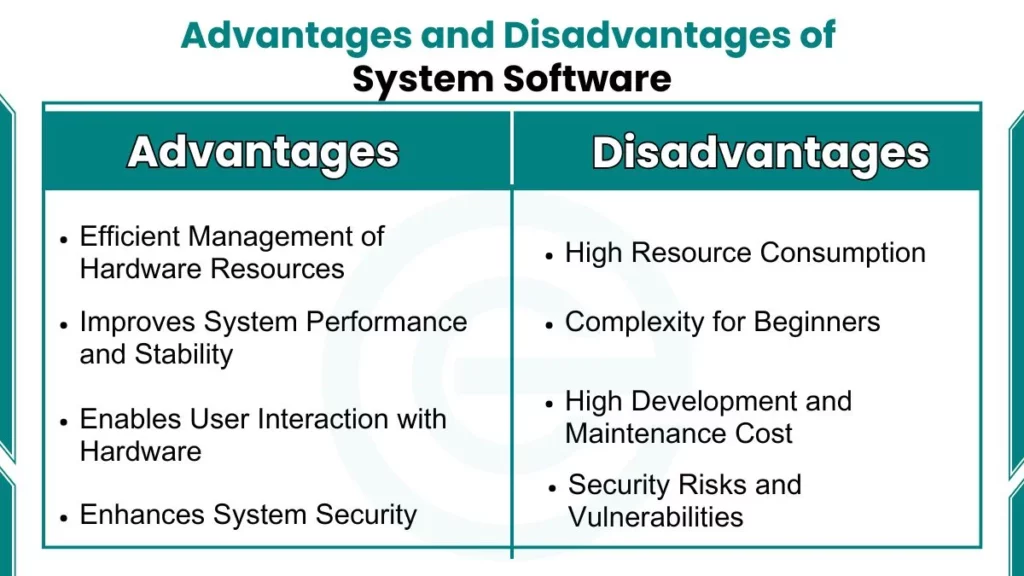
What are Advantages and Disadvantages of System Software?
System software plays a central role in computer functioning. It controls internal operations and manages hardware resources. Understanding its advantages and disadvantages helps students analyze how computers work and why system software is essential.
Advantages of System Software
Here are advantages of system software:
1. Efficient Management of Hardware Resources
System software manages hardware components such as the CPU, memory, storage, and input-output devices. It allocates resources to different processes in a controlled manner. This management ensures that hardware is used efficiently and correctly.
- Controls CPU time and process execution
- Manages primary and secondary memory
- Handles input and output operations
- Prevents resource misuse
2. Provides a Platform for Application Software
System software provides a base on which application software runs. Applications cannot function without system software. It creates an environment where user programs execute smoothly and reliably.
- Supports execution of application software
- Provides system libraries and services
- Ensures compatibility between hardware and applications
3. Improves System Performance and Stability
System software controls process scheduling and memory usage. It reduces conflicts between running programs. This control improves system performance and maintains overall stability.
- Manages process scheduling
- Reduces system crashes
- Maintains system stability
- Ensures smooth operation
4. Enables User Interaction with Hardware
System software provides interfaces such as graphical user interfaces and command-line interfaces. These interfaces allow users to interact with the computer easily. Direct hardware control by users is not required.
- Provides graphical user interface
- Supports command-line interface
- Improves user accessibility
- Reduces operational complexity
5. Enhances System Security
System software manages user authentication and access control. It protects system files and data from unauthorized access. Security features help maintain data integrity and system safety.
- Controls user authentication
- Manages access rights
- Protects system files
- Supports security updates
6. Supports Device Compatibility and Drivers
System software uses device drivers to communicate with hardware devices. Drivers ensure that printers, keyboards, and other devices work correctly. This support improves hardware compatibility.
- Enables hardware communication
- Supports printers and storage devices
- Maintains device compatibility
- Reduces hardware errors
7. Automates System Maintenance Tasks
System software performs routine tasks such as system updates and error checking. It detects system faults and supports recovery mechanisms. Automation reduces the need for manual maintenance.
- Performs system diagnostics
- Supports system updates
- Detects and reports errors
- Manages recovery processes
8. Scalability and System Upgradability
System software supports system upgrades and expansion. New hardware and software components can be added easily. This scalability allows systems to adapt to new requirements.
- Supports hardware upgrades
- Allows software updates
- Adapts to technological changes
- Improves system lifespan
Disadvantages of System Software
Here are drawbacks of system software:
1. High Resource Consumption
System software consumes a significant amount of memory and processing power. On low-end systems, this consumption can reduce performance. Advanced system software may require upgraded hardware.
- Consumes large memory space
- Requires powerful processors
- Affects system speed
- Limits performance on older systems
2. Complexity for Beginners
System software contains complex functions and settings. Beginners may find system configuration difficult. Troubleshooting often requires technical knowledge.
- Complex system settings
- Difficult troubleshooting
- Requires technical skills
- Limited beginner control
3. High Development and Maintenance Cost
System software development requires skilled professionals. Regular updates and security patches increase maintenance costs. These costs affect both developers and users.
- Requires expert developers
- High testing cost
- Frequent updates
- Increased maintenance effort
4. Dependency of Application Software
Application software depends entirely on system software. If system software fails, applications cannot function. This dependency affects overall system usability.
- Applications cannot run independently
- System crashes affect programs
- Limits application flexibility
5. Security Risks and Vulnerabilities
System software may contain bugs or security flaws. Attackers can exploit these vulnerabilities. Continuous updates are required to maintain system security.
- Vulnerable to malware
- Requires security patches
- Bugs affect system safety
- Continuous monitoring needed
6. Limited User Control in Some Systems
Some system software restricts user access to core settings. Advanced customization may not be allowed. This limitation reduces user control over the system.
- Restricted system access
- Limited configuration options
- Reduced customization control
FAQs
What is the main advantage of system software?
It manages hardware resources and supports the execution of application software.
What is a major disadvantage of system software?
It consumes high system resources and may cause slowdowns on low-end computers.
Does system software affect system security?
Yes, it controls access and protects system data from unauthorized use.
